Auto Video Editor: How AI Editors Actually Work in 2026
An auto video editor takes raw footage or a long-form source and produces an edited video without manual timeline work, using AI to handle transcription, moment selection, captioning, and reframing. OpusClip says 20M+ creators and businesses use it, and Vizard, Klap, and Submagic each cover specific strengths.
An auto video editor is a tool that takes raw footage or long-form source video and produces an edited output without manual timeline work. By mid-2026, AI auto-editors are the default starting point for short-form content, and manual editing happens later, if at all.
Below is what auto video editors actually do, how they work under the hood, and which tools produce output that's good enough to ship.
What an auto video editor does
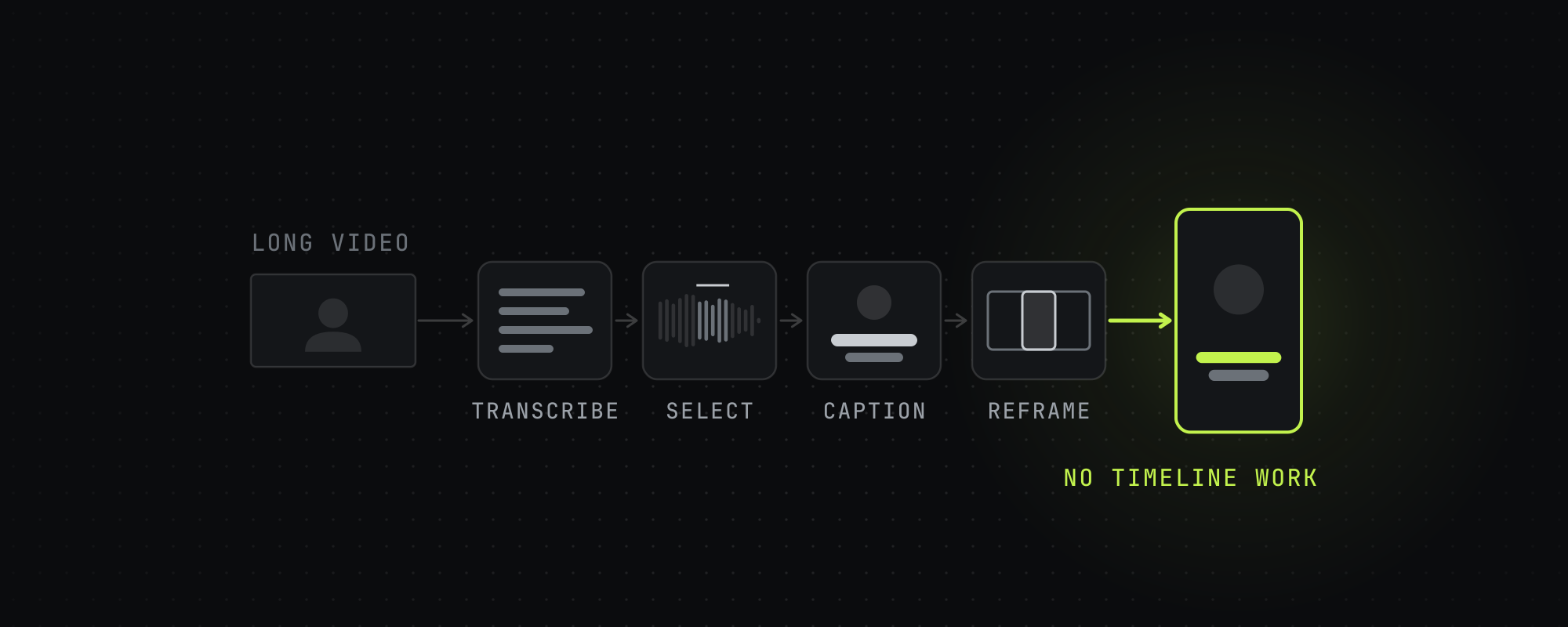
Modern AI auto-editors perform a five-step pipeline. Most users see only the input (drop a video) and the output (multiple edited short clips). The pipeline is the same across major tools, with vendor-specific differences in model quality.
- Ingest and transcribe. The source video is transcribed using Whisper or a proprietary ASR model. Output: a time-aligned transcript with speaker turns and sentence boundaries.
- Score segments. An AI model scores segments by likelihood of working as short-form content — hooks, story beats, contrarian takes, emotional peaks. Some tools attach a numeric "virality score."
- Cut. The highest-scoring segments are extracted as candidate clips. The model selects start and end points to preserve narrative coherence.
- Reframe. Each clip is reframed to vertical (9:16), square (1:1), or kept horizontal (16:9). Subject-tracking AI follows speakers, products, or on-screen action so the cropped frame stays centered.
- Caption and export. Animated captions are rendered word-by-word. Each clip exports at the appropriate aspect ratio with platform-tuned settings.
What "AI" actually means in auto video editing
Three distinct AI capabilities work together in modern auto-editors:
- Automatic speech recognition (ASR). Models like OpenAI's Whisper transcribe audio with word-level timestamps. Vendors publish their own accuracy figures: Submagic claims 99% caption accuracy, which we haven't tested.
- Multimodal understanding. Models combine transcript, visual scene, and audio context to identify segments that work as short-form. OpusClip's ClipAnything is the canonical example.
- Computer vision for tracking. Object detection and tracking keep cropped reframes centered on the relevant subject. OpusClip's ReframeAnything is the most-advertised version, but the underlying technique is standard across the field.
What's missing from most tools in 2026: predictive scoring of actual viral potential. Some tools attach a virality score to each clip. OpusClip's runs from 0 to 99 and shows on its Starter and Pro plans, and its help page doesn't say how well the score predicts views. In March 2026 Meta's research lab released TRIBE v2, a model that predicts how the brain responds to sights and sounds, built for neuroscience research.
Which auto video editors actually work
Our working short list as of mid-2026:
| Tool | Strength | Free tier | Best for |
|---|---|---|---|
| OpusClip | General clipping, used by 20M+ creators and businesses by its own count | 60 min/mo, watermarked | General use, AI editing breadth |
| Submagic | Captions, with a claimed 99% accuracy | A trial of 3 short videos | Caption-driven workflows |
| Vizard | A shared team workspace on its Business plan | 60 min/mo, exported at 720p | Team workflows, long videos |
| Klap | Priced by the clip, from $29 for 100 a month | No free plan listed, a free trial | Budgeting by the clip |
| Reap | API, CLI and MCP on every paid plan | 1 hour/mo, watermarked, 720p | Agent-driven workflows |
| CapCut AI Clip Maker | Inside a full editor | Yes, CapCut says it's free | Beginner workflows |
For an exhaustive comparison, see The Best AI Video Clipping Tools in 2026. For a head-to-head between OpusClip, Submagic, Vizard, and Klap specifically, see OpusClip vs Submagic vs Vizard vs Klap.
What auto editors get wrong
Auto-editors make the same few mistakes, so check every clip for these:
- Mid-sentence cuts. The model decides a clip starts at second 47 but the speaker started their thought at second 43.
- Out-of-context selection. A funny line lifted from a serious discussion that reads as flippant in isolation.
- Caption hallucination. ASR errors on uncommon proper nouns, acronyms, and crosstalk.
- Reframe drift on multi-speaker scenes. When the model has to choose between two speakers, it occasionally picks the wrong one.
- Over-confident virality scoring. The 90+ score clip doesn't always outperform the 65 score clip.
Treat auto-editor output as a rough cut. Let the AI pick the moments and make the first cut, then check and clean up each clip by hand in an editor like CapCut before you post it.
When auto-editing makes sense
- You have long-form source (30+ minutes). The longer the source, the more leverage AI selection provides.
- You're producing volume. Manual editing for 10+ clips per day is unsustainable.
- You need cross-platform output. AI tools auto-reframe; doing this manually is tedious.
- You're scaling a clipping operation. Agencies running clipper armies use AI tools as the production layer underneath.
When auto-editing is the wrong tool
- Short source video already. If your source is under 5 minutes, manual editing in CapCut is faster than uploading to an AI tool.
- High creative requirement. Music videos, narrative shorts, anything where editing rhythm IS the creative product. AI can make a first cut, but the rhythm still takes a human editor.
- Branding-critical output. AI captions occasionally get product names or proper nouns wrong. Branded content needs human review on every clip.
- One-off projects. The signup, upload, learning curve, and credit consumption don't pay off for a single clip.
Where the auto-editor category is going
Three forecasts for the next 18 months. First, transcription becomes a commodity, and tools compete on taste, brand fit and workflow. Second, agents drive more of the editing. OpusClip, Reap and Klap already let an AI assistant run the work over Model Context Protocol (MCP), and more tools will follow. Third, someone will try to score clips with a brain-response model like Meta's TRIBE v2.
For the broader business context — including the marketplaces that depend on auto-editing tools to function — see The Clipper Economy Explained. For the hands-on workflow guide, see How to Start as a Clipper.
Frequently asked questions
What is an auto video editor?
An auto video editor is a tool that produces an edited video without manual timeline work. The user provides raw footage or a long-form source, and the tool handles transcription, moment selection, captioning, and reframing automatically using AI. OpusClip, Vizard, Klap and Submagic are examples, and OpusClip says 20M+ creators and businesses use it.
Are auto video editors free?
Some have free plans with caps, and some only offer a trial. OpusClip's free plan gives 60 minutes of source a month with a watermark, and Vizard's gives 60 minutes a month exported at 720p. Klap's pricing page lists no free plan, and Submagic's trial covers 3 short videos. CapCut says its AI Clip Maker is free.
How accurate are AI video editors?
Vendors publish their own caption figures, like Submagic's claim of 99% accuracy. Moment selection and reframing vary more from clip to clip, so treat AI output as a rough cut and check each clip before you post it.
What is the best auto video editor in 2026?
It depends on the job. OpusClip suits general clipping and footage with little talking, Submagic focuses on captions, Vizard on teams, Klap on paying by the clip, and Reap on API and agent workflows. Our full comparison is in The Best AI Video Clipping Tools in 2026.
Can AI fully replace a video editor?
Not yet. AI handles the mechanical work (transcription, cutting, captioning and reframing) without human input, but taste, brand fit, narrative flow and fixing AI errors still need a person. Use AI for the first cut, and review every clip before you post it.
Sources
Every figure above traces to one of these. Where a source sells the thing it measured, we say so.
- 01OpusClip · OpusClip, read October 15, 2026OpusClip's own count of its users.
- 02OpusClip pricing · OpusClip, read October 15, 2026
- 03What is the Virality Score on OpusClip? · OpusClip help center, read October 15, 2026
- 04Magic Clips · Submagic, read October 15, 2026Submagic's own accuracy claim.
- 05Does Submagic have a free trial · Submagic help center, read October 15, 2026
- 06Vizard pricing · Vizard, read October 15, 2026
- 07Klap pricing · Klap, read October 15, 2026
- 08Klap MCP server · Klap, read October 15, 2026
- 09Reap pricing · Reap, read October 15, 2026
- 10Long video to shorts (AI Clip Maker) · CapCut, read October 15, 2026
- 11Introducing TRIBE v2 · Meta AI, March 26, 2026
Keep reading
The Best AI Video Clipping Tools in 2026
Nine AI clipping tools compared on price, limits and how each picks moments, from OpusClip and Vizard to Reap, Klap and Submagic. Checked October 15, 2026.
OpusClip vs Submagic vs Vizard vs Klap: Head-to-Head Comparison
OpusClip, Submagic, Vizard and Klap compared on price, limits, API access and how each picks clips, from each vendor's own pages on October 15, 2026.
Highstyle vs Descript (2026): Which Is Better for Clips?
Descript is a full editor whose Underlord AI also cuts clips. Highstyle turns a long video into ranked clips. Prices and limits checked October 15, 2026.
What Is Video Clipping? A Complete Guide for 2026
Video clipping is the practice of cutting long-form video into short vertical clips for TikTok, Reels, Shorts, and X. Here is how it works in 2026.