How to Caption Short-Form Videos for TikTok, Reels, and Shorts (2026)
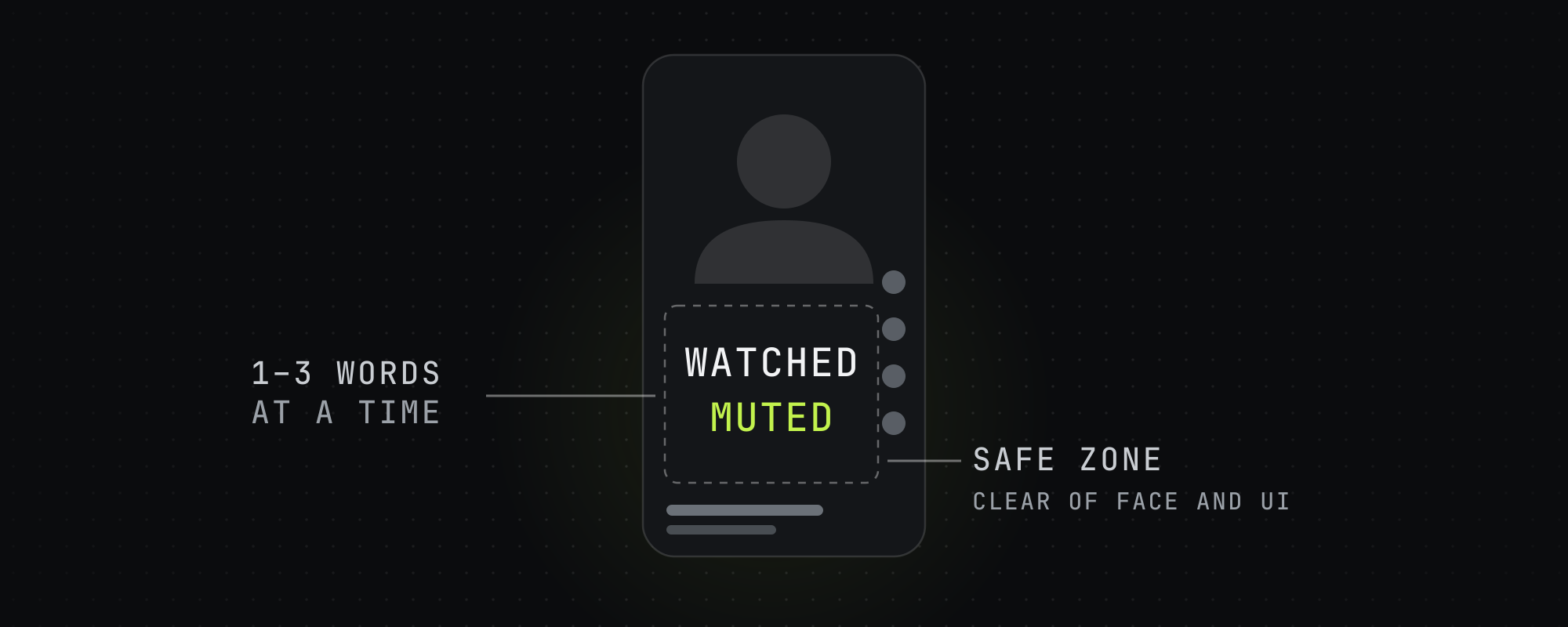
Most short-form video is watched muted, so captions are a retention tool, not an accessibility afterthought. Burn bold sans-serif captions in 1-3 word groups, high contrast, synced word-by-word, placed in a safe zone clear of platform UI and the speaker's face, with a few key words colored for emphasis.
Captions are the single highest-leverage piece of on-screen design in short-form video. Roughly 85% of social video is watched with the sound off, so for most of your audience the captions are the audio. Facebook's own research found that captions raised average view time by about 12%, and other studies measured view-count and brand-recall lifts in the first few seconds. Captions are a retention mechanism first and an accessibility feature second.
This guide covers how to caption a clip the way high-performing accounts do it: the font, the size, the grouping, the placement, the timing, and the color emphasis. It applies whether you're captioning by hand or letting an AI tool burn them in automatically.
Burned-in captions, not platform captions
Always burn captions into the video file rather than relying on TikTok's or Instagram's auto-caption layer. Platform captions are inconsistent across apps, get covered by UI, can't be styled, and disappear when the clip is cross-posted. Burned-in captions render identically everywhere and are part of the creative. The trade-off is that you can't edit them after export, so the transcript has to be right before you render.
Font and weight
Bold sans-serif is the viral standard. Montserrat ExtraBold, Bebas Neue, Proxima Nova Bold, and Impact dominate high-performing clips. The weight matters more than the exact typeface — thin fonts disappear against busy backgrounds and read as low-effort. Avoid serif and script fonts entirely for captions; they lose legibility at thumbnail scale and on small screens.
Size and word grouping
There are two working schools, and both beat dense subtitle blocks:
- Large punchy groups: 1-3 words on screen at a time, very large text (filling 60-80% of the frame width). This is the Hormozi/Submagic look — high energy, very little to read per beat, forces the eye to the words.
- Readable subtitle groups: 4-7 words per line, medium text. Calmer, better for dense educational content or higher-end brand aesthetics where you don't want the captions screaming.
Never put a full sentence on screen at once. Dense blocks raise cognitive load and viewers skip them. Break captions into short groups that advance with the speech.
Placement and safe zones
Each platform overlays its own UI — TikTok's caption and button stack on the right and bottom, Reels' action buttons, Shorts' title and progress bar. Captions placed too low get covered. The reliable answer is to keep captions in the upper or center third of the frame, with an 8-12% margin from every edge, and to avoid covering the speaker's face. If you cross-post the same file, compose once with margins that survive all three platforms' overlays rather than re-positioning per app.
Face-aware placement matters: captions over a talking head's mouth read as a mistake. Position above or below the face depending on framing, not on a fixed pixel value.
Color, contrast, and emphasis
Default to white text. Maintain at least 4.5:1 contrast (WCAG AA) against the footage — achieve it with a dark outline, a soft glow, or a semi-opaque panel behind the words so the text stays legible over bright or busy backgrounds. Then emphasize: color a small fraction of the words (key nouns, the punchline, the number) in an accent like blue, green, or yellow. Emphasis draws the eye to the meaningful word and creates a micro pattern-interrupt without redesigning every caption.
Don't over-color. If every other word is highlighted, nothing is emphasized. A useful rule of thumb is roughly 10-15% of words on the primary accent and a rarer secondary accent on the single biggest word in a clip.
Sync and timing
Captions must be tightly synced to the audio. Lagging or early captions are worse than none — they break the read and lower perceived quality. Word-level timing (each word appears as it's spoken) is the gold standard and is what makes active-word highlighting possible. Practical timing rules:
- Captions appear from the first spoken word, not after a 2-second delay.
- Each group stays on screen long enough to read but advances with speech — don't hold a group while the speaker has moved on.
- Kinetic emphasis (a subtle scale-up or color change on the active word) adds energy, but keep it subtle; aggressive bouncing text is distracting.
The hook card
Separate from the running captions, many top clips open with a hook card: a short headline (the promise of the clip) held on screen for the first 3-4 seconds, often as a large pill or panel. This works in muted autoplay — the viewer reads the promise before any audio registers. Keep it under ~10 words, blunt, and framed as a statement, not a question or clickbait. The hook card and the word-by-word captions together form the dual-caption layout the research repeatedly flags as the strongest sound-off format.
How AI clipping tools handle captions
Modern AI clipping tools transcribe with word-level timestamps and burn styled captions automatically, applying a chosen preset (font, size, position, emphasis colors) across every clip. The quality differences between tools are mostly in transcription accuracy, how natural the emphasis selection is, and whether placement avoids the face and platform UI. For a comparison of how the major tools stack up, see the best AI video clipping tools for 2026 and OpusClip vs Submagic vs Vizard.
Frequently asked questions
Should captions go at the top or bottom of the video?
Upper or center third is the safest default. Platform UI (caption text, action buttons, progress bars) clusters at the bottom and right, so bottom-placed captions often get covered — especially when you cross-post the same file to TikTok, Reels, and Shorts. Keep an 8-12% margin from every edge and avoid covering the speaker's face.
What font is best for short-form video captions?
A bold sans-serif: Montserrat ExtraBold, Bebas Neue, Proxima Nova Bold, or Impact. Weight matters more than the exact typeface — thin or serif fonts lose legibility at small sizes and read as low-effort. Avoid script fonts entirely.
How many words should be on screen at once?
Either 1-3 words in very large text (the high-energy 'Hormozi' style) or 4-7 words per line in medium text for calmer, more readable content. Never display a full sentence at once — dense blocks raise cognitive load and get skipped.
Do captions actually improve views?
Yes. Most social video is watched muted, so captions carry the message for the majority of viewers. Facebook found captions lifted average view time ~12%, and other studies measured higher view counts and brand recall. Captions are a retention tool, not just accessibility.
Should I use the platform's auto-captions or burn them in?
Burn them in. Platform auto-captions are inconsistent across apps, can't be styled, get covered by UI, and vanish when you cross-post. Burned-in captions render identically everywhere and are part of the creative — just make sure the transcript is correct before exporting, since you can't edit them afterward.
Keep reading
10 Short-Form Video Hook Frameworks That Actually Work in 2026
The 10 hook frameworks that drive the highest 3-second hold rates on TikTok, Reels, and Shorts in 2026, with examples and the pacing rules behind them.
How to Edit Podcast Clips That Hold Attention (Jump Cuts, Pacing, Filler)
How to turn long podcast footage into tight vertical clips: jump cuts, filler removal, silence trimming, pacing, reframing, and motion that holds retention.
What Is Video Clipping? A Complete Guide for 2026
Video clipping is the practice of cutting long-form video into short vertical clips for TikTok, Reels, Shorts, and X. Here is how it works in 2026.
The Best AI Video Clipping Tools in 2026
Nine AI clipping tools compared on price, limits and how each picks moments, from OpusClip and Vizard to Reap, Klap and Submagic. Checked October 15, 2026.