How to Edit Podcast Clips That Hold Attention (Jump Cuts, Pacing, Filler)
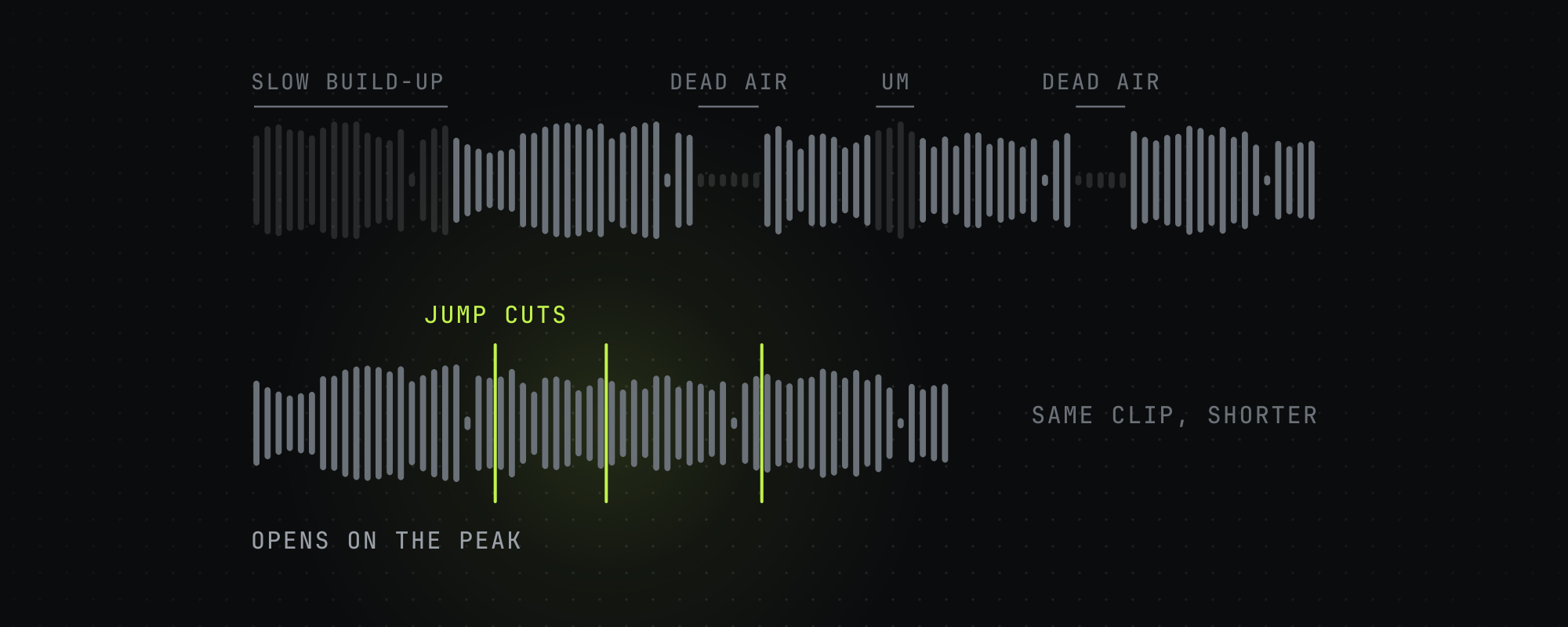
Editing a podcast clip is mostly subtraction: cut the dead air, the filler words, and the slow build-up so the clip opens on the peak moment. Then add pacing — a cut or visual change every few seconds, word-by-word captions, and a punch-in on key beats — so attention never has a chance to drift.
A long-form podcast is recorded for a seated, committed listener. A short-form clip is consumed by someone scrolling at speed who will leave the instant their attention dips. Editing the clip is the process of removing every reason to leave and adding reasons to stay. Most of the work is subtraction.
This is the editing layer specifically — assume you've already picked a strong moment (see how to find viral moments in long videos). Here's how to cut it tight.
Start on the peak, not the build-up
The most common reason a good moment underperforms is that the clip starts 10-15 seconds before the interesting part. Cut the preamble. The very first words the viewer hears should be the contrarian take, the surprising fact, the confession, or the question — not the context that led there. If the payoff lands at second 15 of the conversation, that's where the clip begins, and any context that's genuinely needed gets backfilled after the hook lands.
Jump cuts: remove dead air and filler
A jump cut removes a segment of the timeline and joins the two sides, compressing the clip. The two things you remove most:
- Silences and pauses. Conversational speech is full of gaps — breaths, thinking pauses, dead air between sentences. Cutting pauses tightens pacing dramatically. Leave a small amount (roughly 100-200ms) so the result doesn't feel robotic, but cut anything longer than a beat.
- Filler words. 'Um', 'uh', 'er' add nothing and should be cut entirely. Soft fillers — 'like', 'you know', 'basically', 'actually', 'literally' — are situational: cut them when they're standalone verbal tics, keep them when they carry meaning.
The mechanical caution with jump cuts on captioned clips: when you remove a segment, every word timestamp after that point shifts earlier. If your captions are word-timed, the timing has to be remapped through the cuts or the captions will drift out of sync. Tools that do filler removal and captioning together handle this automatically; if you're cutting by hand, re-sync after cutting.
Fast pacing measurably holds attention. The goal isn't speed for its own sake — it's removing every silent moment where a scroller's thumb starts moving.
Pacing after the hook
Once the hook has landed, the body has to keep resetting attention. Working pacing rules drawn from high-retention clips:
- Introduce a new beat — a cut, a reframe, an on-screen stat, a punch-in — every 3-5 seconds.
- Use tighter micro-cuts (under ~1.2 seconds) in the first couple of shots to 'wake' scrollers, then settle into a steady but tight rhythm.
- Avoid dead air longer than ~250ms anywhere in the clip.
- Don't over-edit. Hyperactive cutting and constant effects erode trust and make a story hard to follow. Smooth, purposeful changes beat frantic ones.

Reframing to vertical
Podcast footage is usually 16:9; short-form is 9:16. A naive center-crop often cuts the speaker out of frame. The reliable approach is speaker-aware reframing: detect the active speaker's face and crop so they stay centered, switching the crop when the speaker changes. For multi-person podcasts, cut between framings on each speaker so the vertical clip follows the conversation rather than showing a static slice of the room.

Motion and visual variety
Talking-head footage is visually static, which works against retention. Add controlled motion: a subtle slow push-in across a line, a punch-in (a quick zoom) on an emphasized word or the punchline, or a reframe on a speaker change. The point is to renew the visual every few seconds without distracting from the words. B-roll can help illustrate a concrete reference, but for talking-head clips it's optional — a clean punch-in on the right beat often does more than stock footage.
Captions are part of the edit
Captions aren't a final garnish — they're a pacing element. Word-by-word captions add visual motion on every word and carry the clip for the ~85% of viewers watching muted. Burn them in, keep them synced, and emphasize key words with color. The full caption playbook is in how to caption short-form videos.
A repeatable edit checklist
- Trim the front so the clip opens on the peak moment.
- Remove silences and hard filler words; remap caption timing through the cuts.
- Reframe to 9:16 with the speaker's face centered.
- Add a cut, reframe, or punch-in every 3-5 seconds.
- Burn in synced word-by-word captions with color emphasis.
- Add a hook card with the clip's promise for the first 3-4 seconds.
- Watch it once muted. If your attention drifts anywhere, cut that part.
Frequently asked questions
What is a jump cut?
A jump cut removes a segment of the timeline and joins the two sides together, compressing the video. In clip editing it's used to delete silences, pauses, and filler words so the pacing stays tight. The visible 'jump' in the subject's position is acceptable — and often invisible — in fast short-form edits.
Should I remove filler words like 'um' and 'like'?
Always remove hard fillers ('um', 'uh', 'er') — they add nothing. Soft fillers ('like', 'you know', 'basically', 'actually') are situational: cut them when they're empty verbal tics, keep them when they carry meaning or rhythm. Over-cutting soft fillers can make speech sound unnatural.
How fast should the pacing be?
Introduce a new beat — cut, reframe, punch-in, or on-screen element — every 3-5 seconds, with tighter micro-cuts in the opening shots. Keep dead air under ~250ms. But don't over-edit: hyperactive cutting erodes trust and makes stories hard to follow.
How do I keep captions in sync after jump cuts?
When you remove a segment, every word timestamp after it shifts earlier, so word-timed captions drift unless you remap them through the cuts. Tools that do filler removal and captioning in one pass handle this automatically; if you cut by hand, re-sync the captions after editing.
Do I need B-roll for podcast clips?
Not necessarily. B-roll helps illustrate a concrete reference, but for talking-head clips a clean punch-in or reframe on a key beat usually does more for retention than stock footage. Add motion to fight the static visual; reach for B-roll only when it genuinely clarifies something.
Keep reading
How to Caption Short-Form Videos for TikTok, Reels, and Shorts (2026)
A practical guide to captioning short-form videos: font, size, placement, word grouping, color emphasis, and the sync rules that lift retention in 2026.
How to Find Viral Moments in Long Videos and Podcasts
How to identify the moments in a long video worth clipping: the share test, the content types that travel, and why moment selection beats editing for going viral.
10 Short-Form Video Hook Frameworks That Actually Work in 2026
The 10 hook frameworks that drive the highest 3-second hold rates on TikTok, Reels, and Shorts in 2026, with examples and the pacing rules behind them.
What Is Video Clipping? A Complete Guide for 2026
Video clipping is the practice of cutting long-form video into short vertical clips for TikTok, Reels, Shorts, and X. Here is how it works in 2026.