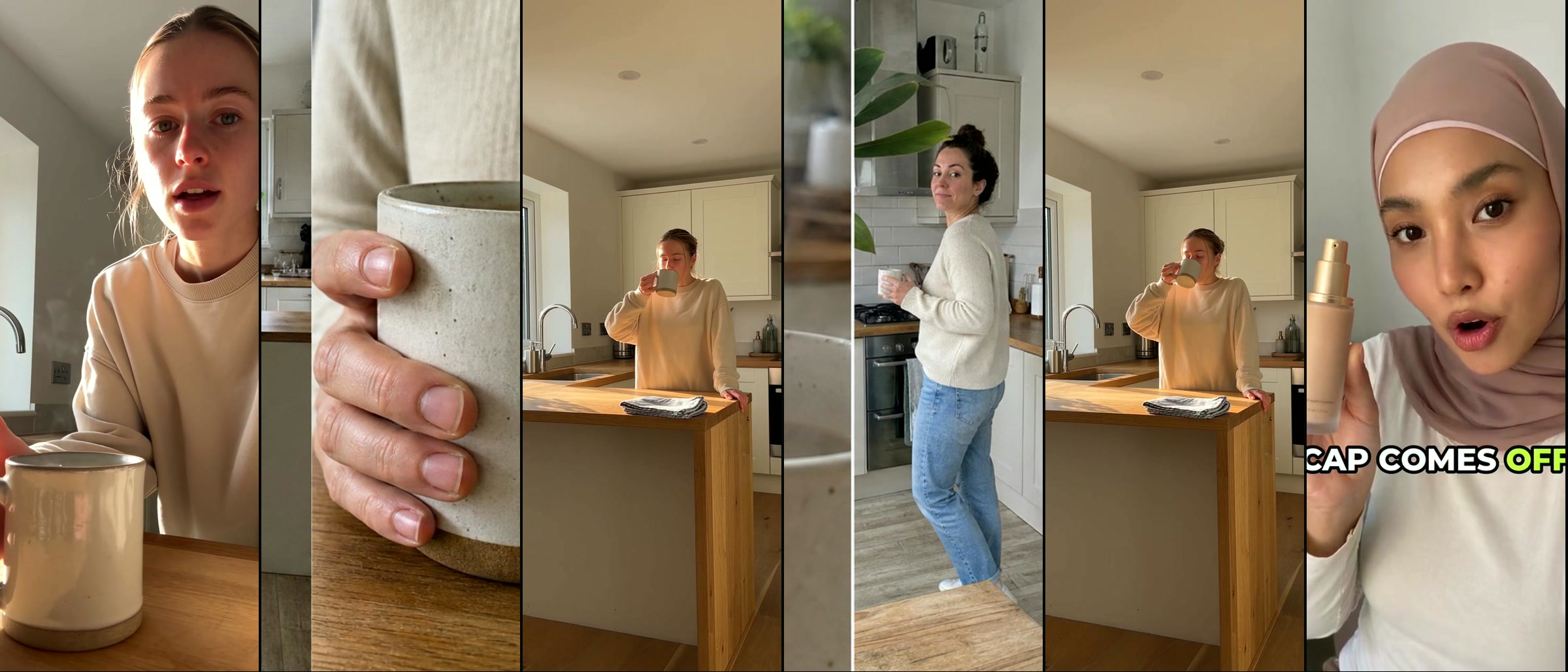
How to Use Seedance 2.5 for Ads Without Burning Credits
Seedance 2.5 rewards a timed shot list rather than a description, so write your beats at roughly one-second granularity with no gaps, give each reference image exactly one job, put dialogue inside the prompt with in-band markers, write the literal string `Hard cut to.` between beats you want to land as cuts, and budget three to ten generations per keeper at roughly $0.23 per 720p second.
Seedance 2.5 rewards a timed shot list, not a description. Write beats at roughly one-second granularity with no gaps, give each reference one job, and put the literal string `Hard cut to.` between beats you want as cuts. It does joint audio and thirty seconds in one pass, launched 31 July 2026 beside a native-4K upgrade to 2.0 that started the "2.5 is 4K" story. Budget three to ten generations per keeper, and thirty to seventy dollars of compute at 720p.
Checked on 10 September 2026. Every price, parameter reading and leaderboard position below was read on or before that date and the surface moves, so re-check anything you plan to quote a client. My parameter readings come from the Higgsfield catalogue, the platform I run this pipeline on. Nothing here is sponsored.
Is Seedance 2.5 4K? The developer surface says no, the marketing page says yes
No developer route I could find exposes a 4K tier for Seedance 2.5. My reading on 10 September 2026, off the Higgsfield catalogue: 480p, 720p and 1080p, 720p by default, no 4K, against a 4K option still sitting on 2.0. The consumer Dreamina surface advertises and appears to deliver 4K, which is what an upscale would look like, so confirm the tier on the surface you are buying before you quote a client native 4K.
| Seedance 2.0 | Seedance 2.5 | |
|---|---|---|
| Duration | 4 to 15 seconds | 4 to 30 seconds, extendable |
| Resolution tiers | 480p / 720p / 1080p / 4K | 480p / 720p / 1080p, varying by provider |
| References | 9 image, 3 video, 3 audio | 30 image, 10 video, 10 audio, 50 total |
| Extra modes | none | `video_edit`, `video_extension` |
Read on 10 September 2026 off the Higgsfield catalogue and one provider's reference. The 2.0 duration ceiling is my own reading of that catalogue rather than a published spec.
Where the myth came from
English coverage merged the 2.5 launch with the 4K upgrade to 2.0 (Chinese coverage kept them apart; TheNextWeb ran the merged version), helped by a consumer page titled "Official Seedance 2.5: 4K & 30s AI Video Generator" while the launch post names no pixel dimension. The content farms followed that copy: seedance.tv sells "Native 4K, 10-bit color", and MindStudio hosts a correct review beside an article adding 4K. I have asked BytePlus which the Dreamina path is.
Where to run it, and what a second really costs
Consumer surfaces sell a credit balance and a UI; developer routes (BytePlus ModelArk, Volcengine Ark, and resellers like fal, Replicate and WaveSpeed) sell per-second billing, which is what you want at volume, since credits price in units you cannot compare.
| Provider | 480p | 720p | 1080p |
|---|---|---|---|
| BytePlus ModelArk (official token rate) | $0.1028 | $0.2312 | not listed |
| Replicate | $0.1028 | $0.2312 | not listed |
| reAPI | $0.1186 | $0.2668 | on request |
| EvoLink | $0.136 | $0.293 | $0.528 (promotional) |
| Atlas Cloud | $0.14 | $0.30 | ~$0.59 (promotional) |
| Kie.ai | $0.14 | $0.315 | on request |
| WaveSpeed Turbo | not listed | $0.20 | $0.21 |
| fal.ai | $0.2205 | $0.4730 | ~$1.14 |
Cost per output second, at rates Cellcog verified on 22 August 2026.
The 720p spread runs from $0.20 to $0.473 in that survey, so the same second costs 2.4 times more depending on whose endpoint you hit. Even the "official" rate is derived from a token formula charging $10.70 per million without video input and $6.40 with, since Cellcog found no 2.5 row on the public ModelArk table at all.
Jobs also queue, which rules out live client review: Segmind timed 18 of them at 60.1 to 226.7 seconds, median 138.9, with identical ten-second requests landing anywhere in that range, so batch the work. Moderation checks the finished video as well, and nobody documents whether a refusal bills, so keep brands out of prompts.
What are the four Seedance 2.5 modes, and when do you use each?
Almost no guide says what each mode bills on, which is the part that costs you money.
| Mode | What you attach | What it bills on | Use it for |
|---|---|---|---|
| `t2v` | prompt only | your output duration | ideation, B-roll, no fixed asset |
| `omni_reference` | prompt plus image / video / audio references | output duration, plus reference video duration | the workhorse for ads |
| `video_edit` | a source video plus reference images | the source video's duration; a concrete `aspect_ratio` draws a 400 on at least one provider | variants from a proven winner |
| `video_extension` | a source clip plus `extension_mode` | the added duration; aspect follows the source | pushing past 30 seconds |
That third row catches people: set duration to eight, feed a twenty-two-second source, and you are billed for twenty-two.
How to use Seedance 2.5 for ads: a shot list with a clock
Veo and Sora reward a descriptive paragraph, which is why people arriving from them write bad Seedance prompts: this model wants a timeline. Runware's docs put it plainly, "Write time ranges at roughly one-second granularity and keep them continuous, with no gaps between windows." Leave a gap and the model improvises filler.
One block of beats from the clip below: `0-3s MEDIUM CLOSE-UP selfie, she lifts the mug and says { This is the only one I finish. } Hard cut to. 3-6s MACRO static on the mug, steam curling. Hard cut to. 6-10s FULL-BODY WIDE at the window.`
fal's guide states the expensive corollary, "The 30-second setting only changes the available duration. It does not add more events to the prompt." Buying thirty seconds for a six-second idea buys twenty-four seconds of drift at full rate.
Segmind reads ByteDance's formula as six parts, subject, action, scene, style, camera and audio, a reseller's reading rather than a quotation. Front-load hard, since the model locks subject and action from the opening words, run one camera move per clip, and give frame position instead of adjectives, because a stated left third of frame is satisfiable where "dynamic tracking" is a guess.
How do I bind reference images to the right job?
Bind each reference explicitly, in prose, and forbid it from doing anything else. fal's guide gives the template: "@Image1 controls only [identity, product, wardrobe, environment, or another invariant]. Do not copy [pose, background, lighting, text, or camera angle] from @Image1." Most people skip the forbidding half, the half that stops a studio backdrop leaking into a kitchen.
- Confirm the upload order of your media array first, because numbering follows it and a wrong order errors nothing: it binds the wrong reference and bills full rate.
- Declare a priority wherever two references could fight over a property, since eleven words of ranking saves a reroll.
- Attach two to four for most shots, where my own pipeline settled: the ceiling of fifty is a trap, and references fighting over one property wastes most of my money.
Tag syntax belongs to the wrapper, square brackets in the ByteDance-facing docs and `@Image1` in fal's examples and my own pipelines, so match your provider and test on a cheap 480p generation.
How do I write dialogue so Seedance lip-syncs it?
Dialogue synthesises and lip-syncs at no extra charge, which removes the separate TTS pass most UGC pipelines were built around. The markers are in-band, documented across Morphic and several prompt guides:
| Content | Marker | Example |
|---|---|---|
| Dialogue | curly braces | `{ I bought this for the commute. }` |
| Music | round brackets | `( soft piano plays under the scene )` |
| Sound effects | angle brackets | `< a bell rings in the distance >` |
| On-screen subtitles | full-width square brackets | `【 Chapter One 】` |
Put language, accent and delivery before the line, since the model reads the instruction then performs the text. One line buried in fal's guide does more for talking-head ads than anything here:
Her mouth moves only during her own lines.
Without it the model animates the mouth through silence, a more obvious tell than the hands or the skin. Word budgets by clip length:
| Clip duration | Spoken word budget |
|---|---|
| Up to 10 seconds | 12 to 20 words |
| 11 to 12 seconds | 20 to 28 words |
| 13 to 15 seconds | 28 to 35 words |
From my own pipeline across roughly forty finished vertical ads, not a measured study.
A thirty-second ad therefore runs about sixty to seventy spoken words on my own budgets above, which forces the discipline that makes these ads work: every event that can be shown gets shown, and a visual beat costs zero words. Emotion lives in the wording, since the model under-renders flat prose.
How do I get real hard cuts instead of a morph?
Two changes together do it. The first is a literal string out of the UGC workflow I run rather than any documentation: `Hard cut to.` after every cut description except the last, which Seedance treats as an edit instruction. fal's examples steer the model away from hard cuts and Runware never mentions them, so it sits untested outside my own work, confounded with the delta rule below.
A boundary snaps into a crisp cut only when the adjacent beats are visually far apart, so every adjacent pair differs on three axes at once:
- POV alternates every slot: selfie, then locked-off static, then selfie.
- Distance band rotates every slot between tight (close-up, macro), mid (medium) and wide (waist-up, full-body).
- A different physical action every slot, so the same hand-and-product configuration never runs twice.
Shifting the angle so the background changes is the strongest cut-forcer, and framing distance goes in capitals every slot, because the model responds to `MEDIUM CLOSE-UP` and ignores "fairly close to camera".
The storyboard sheet
The board trick comes out of a production workflow I run and I have not seen it written up publicly. Instead of eight clips drifting apart, build one 21:9 sheet of eight tall panels in a single row, feed it as a reference in `omni_reference`, and the model returns one continuous clip with eight internal hard cuts, holding person, wardrobe and lighting because the panels came out of one image pass. Worth being precise about the geometry, since the shorthand for this technique usually calls them 9:16 panels and they cannot be: eight true 9:16 slots would need a 4.5:1 sheet, so on a 21:9 board each panel is nearer 1:3.4 and the model reads them as framing cues rather than exact output crops.
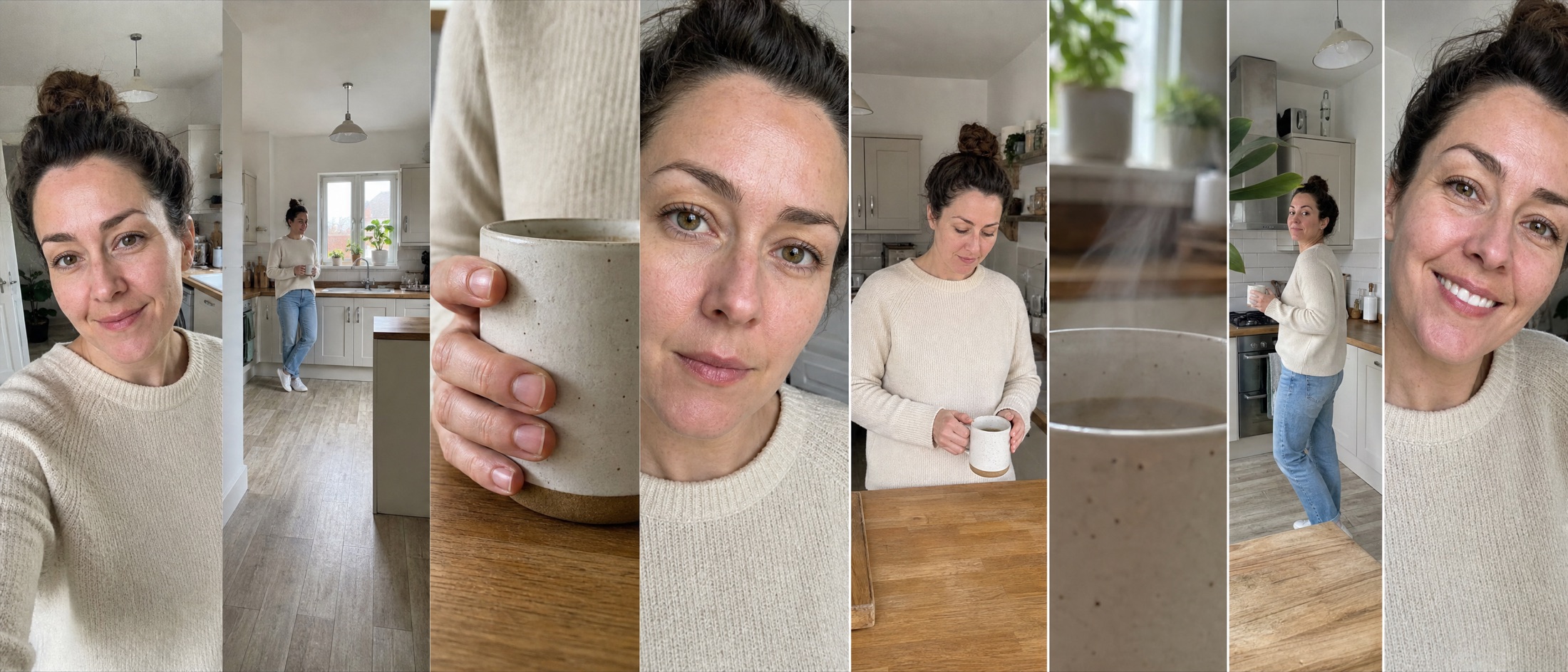
Two limits. A sparse prompt gets the board copied frame-for-frame and looks posed, because the prompt stays the primary signal. And the board's ceiling, in my own runs, sits around fifteen seconds per clip, well inside the model's thirty, so a longer ad means concatenated boards, the previous board appended as the final image media to carry continuity. Assembly is then a stream copy:
`ffmpeg -f concat -safe 0 -i clips.txt -c copy final.mp4`
Why do my character and product drift between shots?
Seedance has no memory across a cut and ships without a product LoRA, an IP-Adapter or a fine-tune, so fidelity is a writing problem. Repeat one fixed physical description verbatim in every cut, restate the invariant list after any occlusion, and give any character who matters a reference image, since the drift people report is usually one of those skipped.
Enumerate product invariants as nouns, since every part you name is a part the model will not redesign: fal's example names "matte cobalt-blue shell, black rubber grip ring, circular copper button, and clear lower chamber" where "sleek modern design" never survives a camera move. Lock the angle and size the product against the hand.
Lock the ending too: the last two to three seconds want a stable medium close-up, label unobstructed, no camera move, no fade to black, a clean pack-shot frame for type. Small legal copy will not survive 720p, so composite real brand assets over the plate.
Other failure modes, and the prompt-side fix for each
Where no source is named below, the fix comes out of my own pipeline.
| Symptom | Why | Prompt-side fix |
|---|---|---|
| A phantom third arm | the beat implies more than two hands | name each hand's role, park the idle one, push the third task to the next cut |
| Extra limbs near mirrors, or a phone in a selfie | reflections spawn duplicate geometry, and the model renders the implied device | ban mirrors and shop windows; in selfie POV the camera is the phone |
| Garbled signage and labels | text rendering is unreliable at any size | labels turned away, the spoken line carries the number, real type in post |
| Speech distortion, "I know" becoming "I low" | phoneme corruption, in MindStudio's hands-on review | cut spoken words, rewrite the line with different vowels |
Then step through evenly spaced frames and every product close-up, watching for clones, a third hand, and a label drifted into a real brand, which gets a takedown rather than a bad ad.
Can I use a real person's face as a reference in Seedance 2.5?
Not directly. BytePlus restricts making video from images containing real faces across the BytePlus, CapCut and Volcengine surfaces, and sanctions two routes: likeness authorisation through the ModelArk console, or its library of over ten thousand virtual human assets. That is why the genre generates a synthetic actor in an image model first, and sanctioned is a long way from risk-free: a generated face resembling a real person creates right-of-publicity and digital-replica exposure.
How do I make ten ad variants from one winning video?
Performance work is where `video_edit` earns its keep, taking one source ad and returning N independently edited versions that hold the source's motion, camera, cuts, lighting, pacing and exact duration, so a proven control stays constant while you vary one thing.
The parameters below are the Higgsfield ad-multiplier workflow's contract rather than ByteDance's API, where Runware's editing docs require duration `"auto"` and refuse width and height alongside a source video. Render it silent: `generate_audio: false`, then remux the source's audio so the winning voiceover survives byte-identical. The text-preservation block is mandatory, once per prompt, verbatim:
Preserve every caption, subtitle, and other untargeted on-screen text element from @Video1 exactly as it appears, including its wording, styling, placement, animation, and timing. Text physically attached to a replaced target follows that replacement.
For a person swap, say the original must never appear in any frame, through cuts, occlusions, reflections and shadows, or it returns in a shop window while you stare at the new actor. Run it only on footage you own or have a release for.
Making it not look AI, which is where the money is
The best evidence points somewhere uncomfortable: the click-through penalty attaches to looking AI, whatever the image is. Exner, Hartmann, Netzer and Zhang ran a sibling-ad design on Taboola over 4,633 matched ads and around 369 million impressions differing only in whether the image was AI-generated. Raw, AI images took 0.76% CTR against 0.65% for human, and experiment fixed effects collapse that gap to parity. Raters then scored 1,751 images blind for artificiality:
| Image is | Reads as | CTR |
|---|---|---|
| AI | not AI | 0.79% |
| Human | not AI | 0.67% |
| AI | AI | 0.62% |
| Human | AI | 0.55% |
From the same sibling-ad study, 460 AI and 1,291 human images rated blind by five raters each.
AI images that disguised their origin beat every human image in the set. The paper names heavy saturation as the AI cue and medium to large faces as reading human, on static images from one platform's inventory.
Counter-evidence pushes the other way. Version 2 of the IAB's disclosure framework carries an NYU Stern finding that labelling an ad as AI-made cut click-through by 31.5%, and Gartner's survey of 1,539 US consumers found half preferring brands that avoid it. So hiding AI cues helps where no label applies, and where one applies you are optimising the wrong variable.
You may not get the choice. BytePlus says it is adding C2PA Content Credentials to its visible watermark, Dreamina carries a visible AI label, and watermark-free downloads sit behind a paid tier. Article 50 of the EU AI Act has applied since 2 August 2026 and makes deployers disclose a video deepfake at first exposure, breaches sitting in the Article 99 tier of 15 million euro or 3% of turnover. I am not your lawyer.
The de-slop pass
I run every storyboard through an image-to-image pass before video, because a grade cannot reach this once the frame moves. It holds framing, composition and product, changing only micro-realism: in goes pore-level skin, real material detail, even daylight, faint sensor noise; out go waxy skin, over-saturation, HDR bloom, oversharpening and the teal-orange grade. Keep face proportions one to one, since a slimmed face reads synthetic. The longer recipe is in the piece on running this as an ad business.


What does a finished 30-second Seedance 2.5 ad cost?
The credit-price pages answer a question nobody has. What you want is the price of a deliverable:
cost per finished second = (raw cost per generated second ÷ keeper rate) ÷ edit retention rate
Keeper rates decide it. Poppify's field aggregation puts mixed work at three to five generations per usable result and six to ten for hands, lip-sync, walking and multiple subjects, which describes every UGC ad ever made. For a thirty-second ad as two fifteen-second boards at five attempts each:
| Line | Assumption | Cost |
|---|---|---|
| Generations | 2 boards x 5 attempts x 15s = 150 output seconds | |
| Compute at the official 720p rate | 150s x $0.2312 | $34.68 |
| Same job through fal at 720p | 150s x $0.4730 | $70.95 |
| Same job at 1080p, on fal's rate | 150s x ~$1.14 | ~$171 |
| Board images and de-slop passes | a handful of image generations | a few dollars |
| Editing labour | the largest line in every honest breakdown | not compute |
My own worked example, priced off the rates above.
That excludes input seconds, refusals and labour, and most shops shoot 1080p, where several providers publish no rate. Higgsfield's pricing post, from a vendor with an interest in the answer, lands in the same window at $30.60 to $69.12 for a finished thirty-second video.
Published yields are thin and they disagree with each other: invideo's FAQ claims roughly 25 percent of clips survive while its own breakdown documents 108 images and 103 videos for 49 used clips.
The saving that beats every per-second discount is approving a still before you spend a generation, then going image-to-video, which roughly halves my generations per keeper. Compute is rarely the biggest line: in the one itemised sixty-second breakdown I could find, editing labour was 44 percent of a $229.80 stack against 31 percent for compute, from a vendor-adjacent source, so trust the ranking over the numbers.
Should I use Seedance 2.5 or Seedance 2.0 for ads?
What you buy with 2.5 is duration, references and the edit modes, so most ad work lands there and the exceptions are narrow. fal keeps a spec-by-spec comparison of the two.
| Situation | Use |
|---|---|
| Talking-head UGC in one take with native audio | 2.5 |
| Cut-heavy vertical ads from a storyboard sheet | 2.5 |
| Variant production from a proven winner | 2.5 (`video_edit` has no 2.0 equivalent) |
| Anything needing more than 15 seconds in one pass | 2.5 |
| Fast action, sports, impacts | 2.0 (2.5 smeared fast motion in my own clips) |
| A genuine 4K deliverable | 2.0 |
| Budget drafts and volume ideation | 2.0 Mini |
The 15-second figure is 2.0's ceiling from the spec table above; the calls are mine, from production work rather than a measured head-to-head.
2.5 costs meaningfully more, with MindStudio putting 720p at about 23 cents per second against roughly 15 for 2.0 and calling the quality gain modest, mostly motion consistency and prompt following. The same logic holds against Veo 3.1 for vertical UGC, though Veo wins on 4K, on fast motion, and on Google's published indemnity. The full comparison goes through the trade.
What the leaderboards do and do not tell you
Be careful with any "tops the leaderboard" claim here. Seedance 2.5 is absent from Artificial Analysis's board. On arena.ai's it is rank 6 on 1482±12, just ahead of 2.0 on 1479±8, and on the video-edit board it sits second on 1410±26 behind Wan 3.0 on 1414±26, four points apart inside error bars of twenty-six. The "#1 in Video Edit" headline is a moved snapshot.
The placing hardly matters, because the sample is portrait-heavy: Wireflow puts more than sixty percent of arena test cases as leaning toward portrait and talking-head scenarios, so a model tuned for close-ups wins a board made of close-ups. No consumer leaderboard measures inter-shot consistency or on-screen text, the two things deciding whether an ad ships, and a September 2026 paper puts inter-shot consistency far below intra-shot (arXiv:2609.06373). VBench-2.0 has no 2.5 entry either (arXiv:2503.21755).
Judge it on fit. Seedance is strong on macro product beauty where physics matter and humans do not, on single-move hero shots ending in a clean pack-shot frame, and on vertical talking-heads in one take. Where I stop reaching for it: fast motion, multi-character interaction, small legible text, and anything needing a specific real person.
Frequently asked questions
Where can I use Seedance 2.5 for free?
Dreamina and Doubao hand new accounts a starting credit balance, and several resellers give a small standing allowance, with Morphic advertising up to 20 credits on a plan it calls forever free. That is enough to watch the model move and nowhere near enough to finish an ad.
Does Seedance 2.5 have a negative prompt field?
No. No `negative_prompt` parameter appeared on any surface I read, which is awkward given how much of the SERP tells you to use one. What works is a terminal negative block in prose at the end of the prompt, the placement Runware's docs describe, where directives like "No subtitles" or "No BGM" are interpreted reliably. Concrete beats generic: "no changes to the logo, label text, bottle shape or packaging proportions" does work that "avoid artifacts" never will.
How do I extend a Seedance 2.5 clip past 30 seconds?
Run `video_extension` against a finished clip with `extension_mode` set forward or backward, and it bills the added duration only, with aspect inherited from the source. ByteDance documents multi-round extension, and in my experience each round compounds drift in the face and the product, so two rounds is the realistic limit.
Does Seedance 2.5 generate sound on its own?
Yes, and it catches people out, because `generate_audio` defaults to true and the model will invent a voice you never briefed. Audio comes back mono inside an MP4 at a fixed 24fps, on a URL signed for 24 hours. For variant production you want it off, so the source ad's own voiceover can be remuxed back on afterwards.
Keep reading
The Best AI Video Model for Ads in 2026: Five Boards, Four Winners
Five leaderboards name four different winners. The best AI video model for ads in 2026, judged on what a finished 30-second spot really costs to make.
AI Ads That Don't Look AI-Generated: The Evidence and the Recipe
AI ads that don't look AI-generated hit parity with human ads in a 369M-impression field test, and only the AI look costs clicks. Evidence, recipe, costs.
Why UGC Ads Beat Polished Video Ads
Phone-shot creator ads outperform studio video on nearly every paid metric. Here's what the numbers actually say, who published them, and where the advantage stops.
How Many Ad Creatives Should You Actually Test?
Only 4-8% of Meta ads become winners, and the median advertiser ships 6-7 a week. Run the arithmetic on what that means for a brand shipping one video a month.