How a Company Turns Webinars, Talks and Recorded Interviews Into Short Clips
Upload the recording or paste its YouTube link, add the company's name as a brand mark, and Highstyle returns up to 10 ranked, captioned 9:16 clips for your team to review, download and post. Starter covers 2.5 hours of recordings a month for $19.
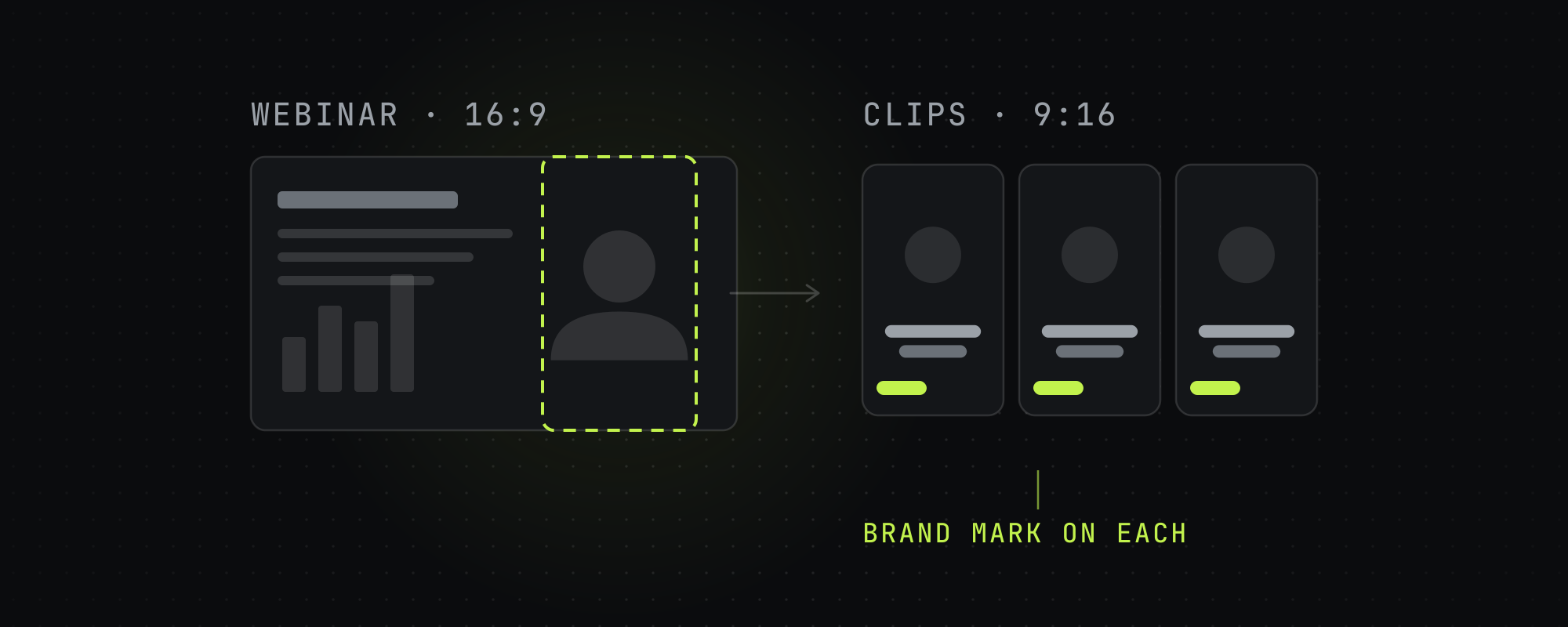
A company can turn a webinar, a conference talk or a recorded interview into short clips by uploading the recording to Highstyle, or pasting its YouTube link, and downloading the clips that come back. Each recording returns up to 10 captioned 9:16 clips, ranked best first, for your team to review and post on the company's channels.
From recording to clips, step by step
- Open Clip Studio, where you start a run. If the recording is on YouTube, paste the public link. If not, export the file from your webinar or event tool and upload it. Uploads take MP4, MOV, WebM, MKV and M4V files up to 10 GB, roughly a three-hour 1080p recording, and a video has to run at least a minute. Private and members-only YouTube videos can't be fetched by link, so upload those as files.
- Pick a goal. Most views makes 15 to 35 second clips, and the Clips row can switch to 70 to 180 seconds. Campaign-safe uses plain captions with no animated effects and no end card, for a quieter look. Best clip length for TikTok, Reels and Shorts covers how long a clip should run on each platform.
- Add the company's name. Type it into the Brand row and choose a color, a typeface and a position. On a paid plan Highstyle burns it small and semi-transparent onto every clip, and on the free plan it goes on the best clip of each batch.
- Set the title language if the event isn't in English. Captions are always in the language spoken. Titles and hook cards follow the language of the video, or any of 20 languages you pick.
- Run it. Highstyle transcribes the recording, picks the moments, trims filler and long pauses, reframes to 9:16 and burns in captions. When no face is on screen, as with slides or a screen share, Auto keeps the whole frame with bars above and below. A run usually takes about 7 minutes, longer for a long recording, and Highstyle emails you when the clips are ready.
- Review the clips in rank order. Each has a score from 1 to 10, a cover image and a title that Highstyle checks against the words in the final cut. How to find viral moments in long videos explains what makes a moment worth keeping.
- Download the clips you want and post them from the company's own accounts. To get an internal approval, send the file or copy the clip's share link, which anyone can open without an account. The share page shows a Highstyle sign-up prompt under the clip.
What comes back
- Up to 10 clips per recording, ranked best first and scored from 1 to 10.
- 9:16 MP4 files with captions burned in, a title card over the opening on the default caption style, and the company's name on a paid plan.
- Filler words and long pauses trimmed at the default pace.
- A music bed under the speech, on by default. You can turn it off in the Sound row, which suits a recording that shouldn't carry music.
- On clips cut from a YouTube link, a one-second Watch the Full Video card at the end that points to the original recording. You can turn it off in the End card row, and uploads don't get one.
How recordings are handled
- The privacy policy says your videos, clips and transcripts are private to your workspace and that Highstyle doesn't publish, sell or license them.
- Uploaded recordings and finished clips are stored with Vercel Blob. Automated software and AI models analyze them, and the policy lists OpenAI's speech-to-text among the providers.
- The policy says your content isn't used to train AI models without your separate opt-in, and that Highstyle's processing providers are contractually barred from training their general-purpose models on it.
- A data processing addendum is available on request, and the policy's business customers section explains how to ask.
Which plan fits a company
Minutes count the length of the video you clip, so a one-hour webinar uses about 60 minutes. Every new account starts with 60 free minutes and needs no card, which is enough for one recording of up to an hour. Clips from free runs carry a small Highstyle watermark, and paid plans export without it.
| Plan | Price | Source video a month | Videos at once |
|---|---|---|---|
| Free | $0 | 60 minutes, once, at signup | 2 |
| Starter | $19 a month, or $159 a year | 150 minutes (2.5 hours) | 3 |
| Pro | $49 a month, or $409 a year | 500 minutes (over 8 hours) | 5 |
| Operator | $199 a month, or $1,669 a year | 2,500 minutes (over 41 hours) | 10 |
Videos at once is how many runs a plan can have in progress. At the limit, Highstyle refuses a new run until one finishes.
- Starter's 150 minutes, 2.5 hours of video, fit two hour-long recordings a month.
- Pro's 500 minutes fit a weekly hour-long recording and leave at least 200 minutes over.
- Operator's 2,500 minutes cover over 41 hours of recordings a month, for a team clipping many of them.
Each month's minutes stay spendable for 60 days. Annual billing costs about 30% less. See every plan on the pricing page.
Try it on one recording
A free account is enough to run one recording and see the clips before you pay. Start with 60 free minutes.
Frequently asked questions
Does Highstyle post the clips for us?
No. Highstyle makes the clips, and your team downloads them and posts them from the company's own accounts.
Does it work on slides and screen shares?
When no face is on screen, Auto keeps the whole frame with bars above and below, so a slide stays in view. A widescreen slide then fills the clip's width and about a third of its height, so check clips cut from slide-heavy sections for small text. When a presenter's face is on screen with the slides, Auto frames around the face and can crop part of a slide, so check those clips too.
Can clips carry our company's branding?
The Brand row burns a short line of text, up to 28 characters, such as the company's name or handle. On a paid plan Highstyle burns it onto every clip, small and semi-transparent, and you pick its color, typeface and position. On the free plan the mark goes on the best clip of each batch in place of the Highstyle watermark.
Does it work on recordings in other languages?
Captions are the transcript, in whatever language is spoken. Titles and hook cards follow that language by default, and you can pick any of 20 languages for them. Check names and product terms in the captions before you post, as you would with any transcript.
What are the limits of a free account?
A free account has 60 minutes, runs 2 videos at a time, and adds a small Highstyle watermark to clips, except the best clip of a batch when you've set a brand mark. Running clips through the API needs a paid plan.
Keep reading
Best Clip Length for TikTok, Reels, and Shorts in 2026
The algorithm-optimized clip lengths for TikTok, Instagram Reels, and YouTube Shorts in 2026 — and why completion rate, not duration, is what you're really optimizing.
How to Find Viral Moments in Long Videos and Podcasts
How to identify the moments in a long video worth clipping: the share test, the content types that travel, and why moment selection beats editing for going viral.
Why Your Content Gets Views but No Customers
A video can perform well on views and still produce nothing for the business behind it. Alex Hormozi's four-part test explains why, and gives you a way to check your own content against it.
Content Is a Business Function, Not a Marketing Channel
A typical seven-figure business publishes 365 pieces of content a year. Alex Hormozi's portfolio publishes 35,000. The gap is staffing, not talent, and it changes how content should be run.