Best AI Clipping Tool for Streamers and Gaming in 2026
For gameplay streams on Twitch or Kick, use a tool built for streams: Eklipse watches your channel and reads gameplay, audio and chat, and StreamLadder's Creator plan finds up to 30 clips per stream and frames your facecam. Reap and OpusClip Pro take Twitch links and handle mixed content. Highstyle fits talk-heavy streams once the VOD is on YouTube, where it reads the replay graph and comments.
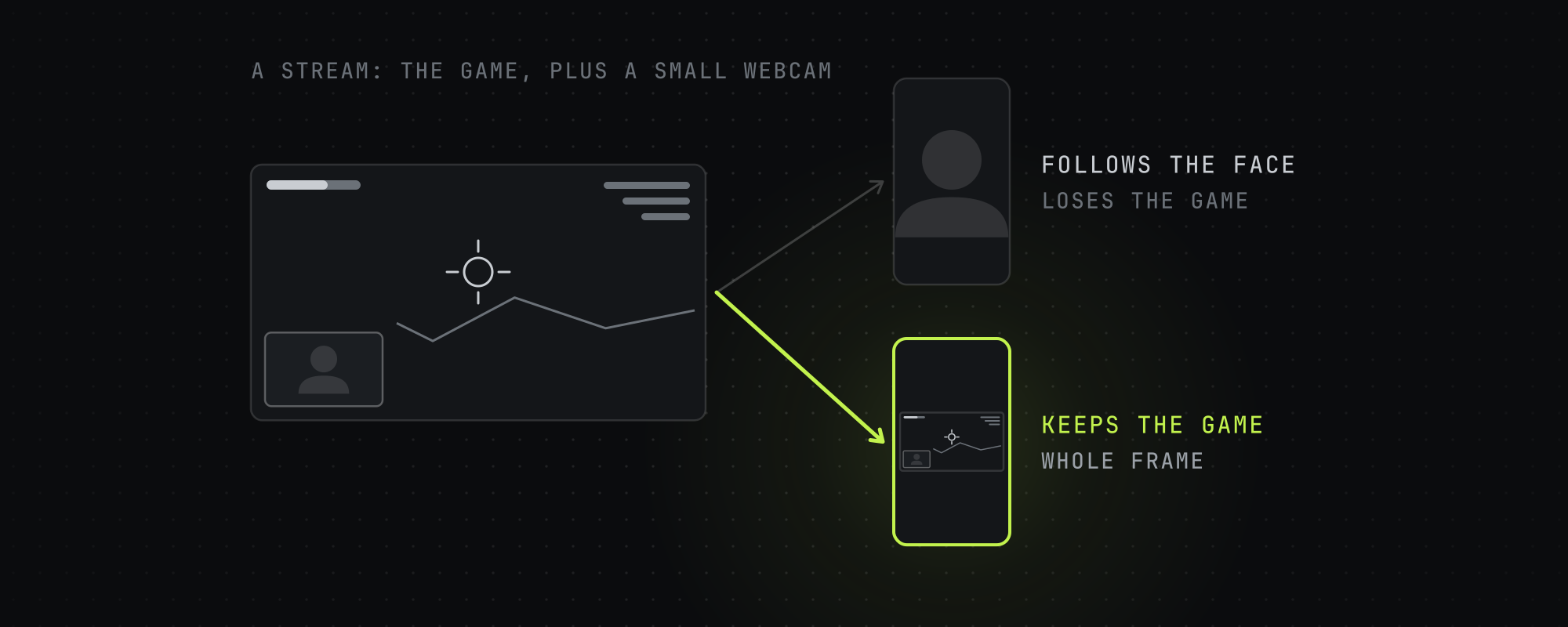
Streams trip up AI clippers in two places. The best moment is often a play with no words in it, so a clipper that reads the transcript walks right past it. And the frame holds two subjects, the game and a small webcam, so a crop that follows faces can zoom into the webcam and lose the game.
So start with what your stream sounds like. A shooter played in quiet focus with a loud chat needs a tool that reads gameplay and chat. A Just Chatting stream or a podcast you stream live is closer to a talking-head video, and general clippers do well on it. We read each tool's pages on October 15, 2026, and every figure below links to its source. Highstyle is our product.
Six tools side by side
| Tool | Takes streams from | Finds moments by reading | Built for gaming | Price |
|---|---|---|---|---|
| Eklipse | Twitch, YouTube Live and Kick channels | Gameplay events, audio and chat | Yes, 1,000+ games | Free plan with 3 clips per stream. Paid prices show after sign-up |
| StreamLadder | Twitch and Kick streams, and single clips from Twitch, Kick, Trovo or YouTube | ClipGPT, up to 30 clips per stream | Yes, with facecam detection | Free editor. Paid plans priced in your local currency |
| OpusClip | Twitch links on Pro. YouTube links and uploads on every plan. Its help center lists Kick links too | Visual, audio and sentiment cues | A screenshare and gameplay layout on every plan | $29 a month for Pro, which adds Twitch, or $14.50 billed yearly |
| Reap | YouTube, Twitch, X and Vimeo links on every plan | Several signals, with genre models | A gaming model on paid plans | $16.99 a month, or $9.99 billed yearly |
| Vizard | Uploads up to 600 minutes, and Twitch links in its API | AI clipping with a 0 to 10 viral score | Not listed | $29 a month for 600 minutes |
| Highstyle | YouTube links, and uploads up to 10 GB | The transcript, YouTube's most-replayed graph and timestamped comments | No. Use the Fit layout for gameplay | $19 a month for 150 minutes |
From each tool's own pages on October 15, 2026. The price is the cheapest plan that takes the streams in the second column.
Gameplay-first streams: Eklipse or StreamLadder
Eklipse connects to your Twitch, YouTube Live or Kick channel and watches your streams for you. Its FAQ says it reads gameplay patterns like kills and wins, audio spikes like laughter and rage, and chat sentiment like emote spikes, then scores each moment. It supports 1,000+ games, lets you say "Clip that" mid-stream and publishes to TikTok, Shorts, Reels and X. The free plan gives 3 clips per stream, and the Pro and Team plans are unlimited. Its pricing link goes to sign-up, so you'll see the prices after you make an account.
StreamLadder's free plan turns a single clip into a vertical video: pick a clip from Twitch, Kick, Trovo or YouTube, choose a layout and export at 720p. The Creator plan adds ClipGPT, which processes whole Twitch or Kick streams and returns up to 30 edited clips per stream with captions, hashtags and hooks, and it detects and frames your facecam. Pro exports 4K at 60fps. StreamLadder shows prices in your local currency, so check its pricing page for yours.
Mixed content: OpusClip, Reap or Vizard
If you clip streams and other video, a general clipper keeps it all in one place. OpusClip imports Twitch links on Pro, at $29 a month or $14.50 billed yearly for 300 minutes, and every plan, the free one included, has a screenshare and gameplay layout. Its ClipAnything model reads visual, audio and sentiment cues, can clip video with little or no dialogue, and takes a plain-language request for the scene you want.
Reap imports YouTube, Twitch, X and Vimeo links on every plan, and its paid plans add a gaming-specific model and layouts that switch between a single crop, a zoom-out and a split. Creator is $16.99 a month, or $9.99 billed yearly, for 10 hours of video.
Vizard suits long VODs. One upload can run 600 minutes, and its API takes Twitch links and YouTube videos, though not a YouTube stream that's still live. Creator is $29 a month for 600 minutes.
Talk-heavy streams on YouTube: Highstyle
Highstyle is ours, and it fits streams where the talking is the content, like Just Chatting, commentary, reactions or a podcast you stream live. Once the VOD is on YouTube, paste its link and Highstyle reads the transcript, the most-replayed graph and the timestamped comments, then returns up to 10 captioned 9:16 clips ranked best first. A clip picked from viewer signal opens to show the comments that flagged it.
Highstyle doesn't take Twitch or Kick links. Download the VOD and upload the file, up to 10 GB, or wait until it's on YouTube. Paid plans take sources up to 12 hours long and the free plan up to 4, and a run usually takes about 7 minutes, longer for a long video.
Highstyle picks moments from what's said and from how YouTube viewers reacted, so a silent clutch play with no commentary and no replay spike won't stand out to it. Its automatic framing also follows the speaker, which on a stream is often a small webcam, so set the layout to Fit before you run gameplay through it. Fit keeps the whole game in frame with bars above and below.
Your first video is free, 60 minutes once with a small watermark. Starter is $19 a month for 150 minutes, about 2.5 hours of video, and the rest of the plans are on the pricing page.
Which one to pick
- You stream shooters, battle royales or other fast games on Twitch or Kick and want clips without touching anything: Eklipse.
- You want your facecam framed over the gameplay and like to edit each clip: StreamLadder.
- You clip streams and other video and want one tool: OpusClip Pro or Reap.
- Your VODs run for hours and you want the most minutes for the money: Vizard or Reap.
- Your stream is mostly talking and ends up on YouTube: Highstyle.
Your first video on Highstyle is free, so paste a stream's YouTube link on the home page to see what it picks. If you're comparing general clippers too, the Opus Clip alternatives roundup covers price and limits, and best clip length by platform covers how long each clip should run.
Frequently asked questions
What is the best AI clipping tool for Twitch streamers?
For gameplay streams, Eklipse or StreamLadder, since both connect to Twitch and Kick and are built around streams. Eklipse reads gameplay, audio and chat, and StreamLadder's Creator plan finds up to 30 clips per stream and frames your facecam. If you also clip other video, Reap and OpusClip Pro take Twitch links.
Can AI clip gameplay without commentary?
Some tools can. Eklipse reads gameplay events, audio spikes and chat, and OpusClip's ClipAnything reads visual, audio and sentiment cues. Tools that pick from the transcript, Highstyle included, need someone talking, or on YouTube a replay spike or comments, to find the moment.
Is there a free AI clipping tool for streamers?
Eklipse's free plan gives 3 clips per stream, StreamLadder's free editor turns single clips into vertical videos at 720p, and Reap's free plan gives 1 hour a month with a watermark and takes Twitch links. Highstyle's first video is free, 60 minutes once, with a small watermark.
Can Highstyle clip Twitch or Kick VODs?
Not by link. Highstyle takes YouTube links and file uploads up to 10 GB, so download the VOD and upload it, or post it to YouTube first. Paid plans take sources up to 12 hours long.
How do I keep the game and my facecam in a vertical clip?
StreamLadder detects and frames your facecam and has preset and custom layouts, and OpusClip has a screenshare and gameplay layout on every plan. In Highstyle, the Fit layout keeps the whole frame, game and webcam together, with bars above and below.
Which AI clipping tools support Kick?
Eklipse connects to Kick channels, and StreamLadder's ClipGPT processes Kick streams. OpusClip's help center lists Kick among the links it takes. Reap, Vizard and Highstyle don't list Kick links, so download the VOD and upload the file to any of them.
Sources
Every figure above traces to one of these. Where a source sells the thing it measured, we say so.
- 01Eklipse · Eklipse, read October 15, 2026Platforms, detection signals, games and free-plan limits, from the FAQ on the home page.
- 02Plans and pricing · StreamLadder, read October 15, 2026Plan features. Prices display in the visitor's local currency.
- 03OpusClip pricing · OpusClip, read October 15, 2026Import sources by plan and the screenshare and gameplay layout row.
- 04ClipAnything · OpusClip, read October 15, 2026
- 05Video sources supported · OpusClip help center, read October 15, 2026The links OpusClip takes, Kick included.
- 06reap pricing and plans · Reap, read October 15, 2026
- 07Vizard pricing · Vizard, read October 15, 2026
- 08Submit a long video: minimum setup · Vizard API docs, read October 15, 2026The video sources the API accepts.
- 09Retrieve output videos · Vizard API docs, read October 15, 2026
- 10Highstyle pricing · HighstyleOur own pricing page. The figures here come from the same code.
- 11Highstyle API and MCP docs · HighstyleOur own docs, including the layout options.
Keep reading
Opus Clip Alternatives in 2026: 5 AI Clippers Compared on Price and Limits
Five Opus Clip alternatives checked on October 15, 2026: Vizard, Reap, Klap, Submagic and Highstyle, compared on price, minutes, Twitch links and API access.
Highstyle vs Vizard (2026): Price, Limits and How Each Picks Clips
Vizard sells more minutes per dollar, 4K exports and scheduling. Highstyle reads YouTube's replay graph and comments to pick moments. Checked October 15, 2026.
Best Clip Length for TikTok, Reels, and Shorts in 2026
The algorithm-optimized clip lengths for TikTok, Instagram Reels, and YouTube Shorts in 2026 — and why completion rate, not duration, is what you're really optimizing.
Highstyle vs OpusClip (2026): Which Picks Better Moments?
OpusClip clips almost any footage and starts at $15 a month. Highstyle reads YouTube's replay graph and comments to pick moments. Checked October 15, 2026.