Opus Clip Alternatives in 2026: 5 AI Clippers Compared on Price and Limits
Reap and Vizard sell the most video per dollar, Klap charges by the clip, Submagic is a caption editor with long-video clipping sold as a $19 add-on, and Highstyle picks moments from YouTube's most-replayed graph and timestamped comments. Before you switch, price OpusClip's own Pro plan: at $29 a month it includes Twitch import, its API and an MCP connector.
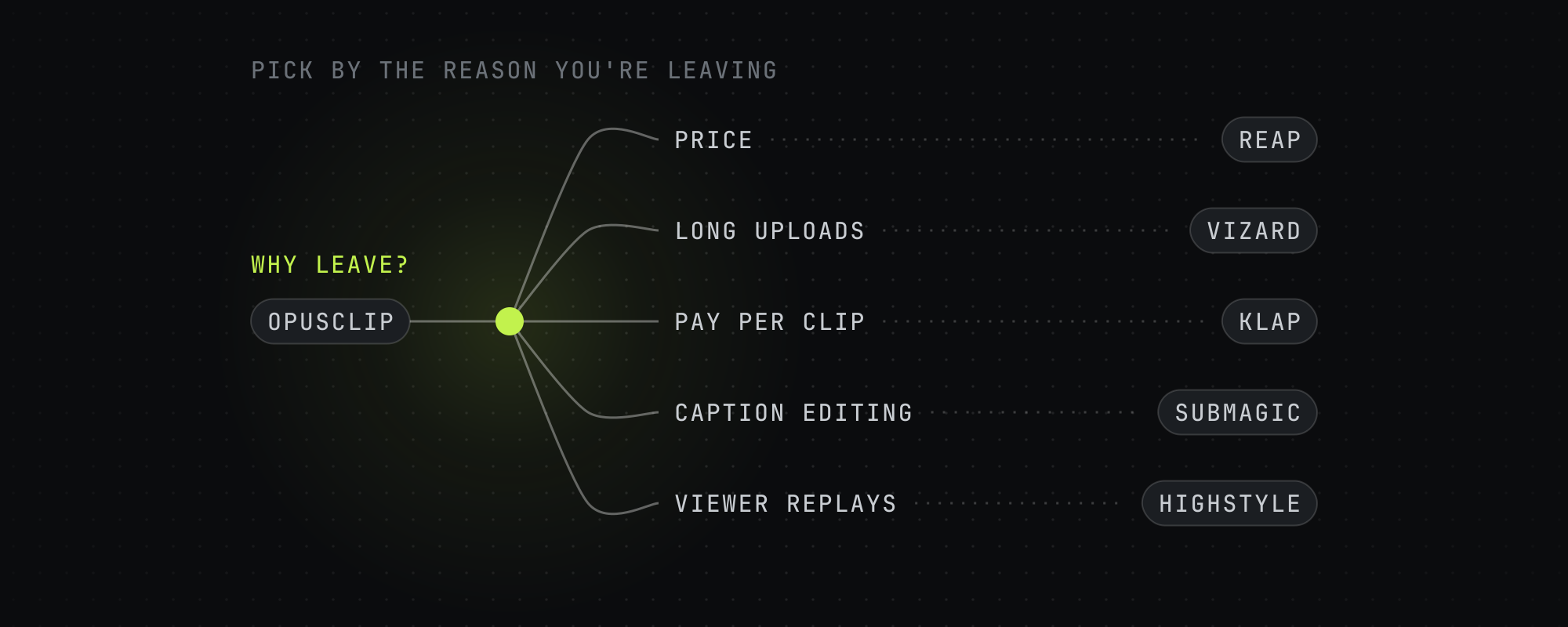
The usual reasons to look past OpusClip are price, its free plan, the way it picks moments and API access. Each of those has a different best answer, so the list at the end matches each reason to a tool.
We read every tool's pricing and help pages on October 15, 2026, and each figure below links to the page it came from. Highstyle is our product. Its section sticks to what our pricing page and API docs say, and the cost table shows where it loses.
OpusClip's own plans run from $15 to $29 a month
OpusClip's pricing page lists four plans. Free gives 60 credits a month, and a credit is one minute of source video, according to its help center. Free clips carry a watermark, can't be edited and stop being exportable after 3 days. Starter costs $15 a month, billed monthly only, for 150 minutes, and adds the virality score and watermark-free export. Pro costs $29 a month, or $14.50 a month billed at $174 a year, for 300 minutes that roll over for 2 months.
Pro is also where Twitch, Dropbox, Riverside and nine other import sources switch on, along with 1:1 and 16:9 exports and a team workspace with 2 seats. OpusClip's compare table lists its Video Editing API, Scheduler API and MCP connector on Pro, and Business is priced by quote. So if the API or Twitch is your reason to leave, price Pro first.
OpusClip's ClipAnything reads visual, audio and sentiment cues and can clip video with little or no dialogue, according to its ClipAnything page. If most of your footage has little talking, check that an alternative can clip it before you switch. Highstyle picks moments from what's said and from how viewers reacted on YouTube, so it can't.
Five alternatives side by side
| Tool | Free plan | Entry paid plan | A month buys | Twitch links | API |
|---|---|---|---|---|---|
| OpusClip | 60 minutes a month, watermarked, exportable for 3 days | $15 a month, monthly only | 150 minutes | Pro and Business | Pro and Business, with MCP |
| Vizard | 60 minutes a month at 720p, watermarked | $29 a month, or $14.50 billed yearly | 600 minutes | In its API | Paid plans, no extra fee |
| Reap | 1 hour a month at 720p, watermarked | $16.99 a month, or $9.99 billed yearly | 10 hours | Every plan | Paid plans, with a CLI and MCP |
| Klap | None listed | $29 a month, or $14 billed yearly | 100 clips | Through its MCP server | API and MCP server |
| Submagic | A trial of 3 short videos, watermarked | $19 a month, plus $19 for Magic Clips | 15 short videos, plus 10 long-video uploads with Magic Clips | Not listed | 10 API minutes a month, packs from $57 |
| Highstyle | First video free: 60 minutes once, watermarked | $19 a month, or $159 a year | 150 minutes | No, YouTube links and uploads | Paid plans, with MCP |
Entry paid plan for each tool, from each vendor's own pages on October 15, 2026. Prices are in US dollars.
What an hour of video costs on each plan
Klap counts clips and Submagic counts videos, so they're left out. For the tools that sell minutes, this is the monthly price divided by the hours of source video it buys. Reap and Vizard win clearly, and Highstyle's plans run from $4.78 to $7.60 an hour.
| Plan | Monthly price | Per hour of video |
|---|---|---|
| Reap Creator | $16.99 for 10 hours | $1.70 |
| Reap Studio | $45 for 20 hours | $2.25 |
| Vizard Creator | $29 for 600 minutes | $2.90 |
| Vizard Business | $39 for 600 minutes | $3.90 |
| Highstyle Operator | $199 for 2,500 minutes | $4.78 |
| OpusClip Pro | $29 for 300 minutes | $5.80 |
| Highstyle Pro | $49 for 500 minutes | $5.88 |
| OpusClip Starter | $15 for 150 minutes | $6.00 |
| Highstyle Starter | $19 for 150 minutes | $7.60 |
Sorted cheapest first, on monthly billing. Yearly billing takes 50% off Vizard and OpusClip Pro, 41% off Reap Creator and about 30% off Highstyle.
Vizard: the most minutes for long uploads
Vizard's Creator plan is $29 a month for 600 minutes, or $14.50 a month billed at $174 a year, and a single upload can run 600 minutes and 30 GB. Exports go up to 4K, and you can schedule posts to 6 social accounts. Business is $39 a month and adds a shared workspace, a brand kit and team seats at $5 a month each. The free plan gives 60 minutes every month, exports at 720p and keeps projects for 3 days.
Vizard's API comes with both paid plans at no extra charge and spends the same minutes, according to its API docs. It takes YouTube, Twitch, TikTok, Vimeo and Google Drive links, and each clip comes back with a viral score from 0 to 10 and a written reason. We go deeper in Highstyle vs Vizard.
Reap: the cheapest paid plan, with Twitch on every tier
Reap's Creator plan costs $9.99 a month billed at $119.88 a year, or $16.99 month to month, for 10 hours of clipping. Studio doubles that to 20 hours with up to 3 users, at $29 a month yearly or $45 monthly. Every plan, the free one included, imports from YouTube, Twitch, X and Vimeo.
Paid plans add API, CLI and MCP access, dubbing in 80+ languages and genre models tuned for talking heads, presentations and gaming. Captions come in 100+ languages on every plan. The free plan gives 1 hour a month at 720p with a watermark, and its projects expire after 7 days.
Klap: plans priced by the clip
Klap's plans count clips. Basic is $29 a month for 100, Pro is $79 for 300 and Pro+ is $189 for 1,000, and yearly billing cuts those to $14, $39 and $94 a month. Its pricing page sums it up as "Only pay for clips you generate," which makes it easy to budget if you think in posts a day.
Klap's API takes a YouTube URL or a video file and writes captions in over 100 languages. Its MCP server takes YouTube, Twitch, Kick and Vimeo links and signs in with your Klap account, so Claude, ChatGPT or Cursor can ask it for clips. The pricing page lists no free plan.
Submagic: a caption editor with clipping as an add-on
Submagic's plans are built for editing short videos. Starter is $19 a month per member for 15 videos, Pro is $39 for 40 and Business is $69 for 100, or $12, $23 and $41 a month billed yearly. Its help center caps each upload at 2 minutes on Starter, 5 on Pro and 30 on Business.
Long-video clipping is a separate add-on called Magic Clips, at $19 a month for 10 uploads. It takes a YouTube link, a file or a public Google Drive link and returns 20 or more clips, each with a virality score. Submagic's strength is what happens after the cut: caption templates, B-roll, auto zooms and 4K export on Business. More in Highstyle vs Submagic.
Highstyle: moments picked from what viewers replayed
Highstyle is ours. Paste a YouTube link or upload a file, and it returns up to 10 captioned 9:16 clips, ranked best first. Before it picks, it reads the transcript, YouTube's most-replayed graph and the timestamped comments under the video, and a clip chosen from that signal says so and shows the comments behind it. A video posted today has no replays or comments yet, so on new uploads it reads the transcript alone.
Your first video is free: 60 minutes once at signup, no card, with a small watermark on the clips. Paid plans cost $19, $49 or $199 a month for 150, 500 or 2,500 minutes, take sources up to 12 hours long and include the API and an MCP server. Highstyle takes YouTube links and uploads only, doesn't post clips for you and costs more per hour than Reap or Vizard. Every plan is on the pricing page.
Twitch and Kick streamers have two more options
Eklipse connects to your Twitch, YouTube Live or Kick channel and reads gameplay, audio and chat to find moments, and its free plan gives 3 clips per stream. StreamLadder's Creator plan runs its ClipGPT over whole Twitch or Kick streams for up to 30 clips each and frames your facecam. Of the five alternatives above, Klap's MCP server takes Twitch and Kick links. Reap takes Twitch links on every plan, and Vizard's API accepts them. We compare six options for streamers in the best AI clipping tool for streamers and gaming.
Which alternative to pick
- You want the most video for the least money: Reap Creator if 10 hours a month covers you, Vizard Creator if you upload multi-hour files or need 4K.
- You budget by output, say three clips a day: Klap, since its plans count clips.
- You already have short videos and want captions, B-roll and zooms: Submagic. Add Magic Clips only if you also cut long videos.
- You clip YouTube videos that already have views, like podcasts, interviews or a back catalog: Highstyle, because it reads where viewers rewound and commented.
- You stream on Twitch or Kick: Eklipse or StreamLadder, or Reap if you clip other video too.
- Your footage has little talking, like sports or vlogs: stay on OpusClip and use ClipAnything.
- You want to drive clipping from code or an AI assistant: Reap, Klap, Highstyle and OpusClip Pro all offer an API and MCP, and Vizard's API comes with its paid plans.
Your first video on Highstyle is free, so paste one of your YouTube links on the home page to see what it picks.
Frequently asked questions
What is the best Opus Clip alternative?
It depends on why you're leaving. Reap and Vizard give the most video per dollar, Klap suits people who budget by clip count, Submagic is best for caption editing, and Highstyle suits YouTube videos that already have viewers, because it reads the most-replayed graph and timestamped comments. Streamers should look at Eklipse and StreamLadder.
Which Opus Clip alternative is cheapest?
Reap's Creator plan, at $9.99 a month billed yearly or $16.99 month to month for 10 hours of video, according to its pricing page on October 15, 2026. Vizard's Creator plan is next at $29 a month for 600 minutes, or $14.50 a month billed yearly.
Is there a free alternative to Opus Clip?
Vizard's free plan gives 60 minutes a month and Reap's gives 1 hour, both exported at 720p with a watermark. Highstyle's first video is free, 60 minutes once at signup with a small watermark, and Submagic's trial takes 3 short videos. OpusClip's own free plan gives 60 minutes a month, with clips exportable for 3 days.
Does OpusClip have an API?
Yes. OpusClip's pricing page lists its Video Editing API, Scheduler API and MCP connector on Pro, which costs $29 a month, and on Business, which is priced by quote. Free and Starter don't include them.
Which Opus Clip alternatives can import from Twitch?
Reap imports Twitch links on every plan, Vizard's API accepts them, and Klap's MCP server takes Twitch and Kick links. Eklipse and StreamLadder connect to Twitch and Kick streams directly. OpusClip itself imports from Twitch on Pro and Business. Highstyle takes YouTube links and file uploads, so download a Twitch VOD and upload the file.
Is Highstyle better than OpusClip?
For YouTube videos that already have viewers, Highstyle reads the replay graph and timestamped comments, and it shows you the comments behind each pick. OpusClip costs less per hour at the entry level, imports from more places and exports 1:1 and 16:9 on Pro. For footage with little talking, OpusClip's ClipAnything is the better tool. More in Highstyle vs OpusClip.
Sources
Every figure above traces to one of these. Where a source sells the thing it measured, we say so.
- 01OpusClip pricing · OpusClip, read October 15, 2026Plans, credits, import sources and the API rows of the compare table.
- 02How are credits consumed · OpusClip help center, read October 15, 2026
- 03ClipAnything · OpusClip, read October 15, 2026
- 04Vizard pricing · Vizard, read October 15, 2026
- 05API pricing · Vizard API docs, read October 15, 2026
- 06Submit a long video: minimum setup · Vizard API docs, read October 15, 2026The video sources the API accepts.
- 07Retrieve output videos · Vizard API docs, read October 15, 2026
- 08reap pricing and plans · Reap, read October 15, 2026
- 09Klap pricing · Klap, read October 15, 2026
- 10Klap API · Klap, read October 15, 2026
- 11Klap MCP server · Klap, read October 15, 2026Link sources, Twitch and Kick included.
- 12Submagic pricing · Submagic, read October 15, 2026
- 13How much does it cost to use Submagic · Submagic help center, read October 15, 2026The Magic Clips add-on price.
- 14Size and video length limit for each video · Submagic help center, read October 15, 2026
- 15How to use Magic Clips · Submagic help center, read October 15, 2026
- 16Does Submagic have a free trial · Submagic help center, read October 15, 2026
- 17Eklipse · Eklipse, read October 15, 2026Supported platforms and free-plan limits, from the FAQ on the home page.
- 18Plans and pricing · StreamLadder, read October 15, 2026
- 19Highstyle pricing · HighstyleOur own pricing page. The figures here come from the same code.
Keep reading
Highstyle vs OpusClip (2026): Which Picks Better Moments?
OpusClip clips almost any footage and starts at $15 a month. Highstyle reads YouTube's replay graph and comments to pick moments. Checked October 15, 2026.
Highstyle vs Vizard (2026): Price, Limits and How Each Picks Clips
Vizard sells more minutes per dollar, 4K exports and scheduling. Highstyle reads YouTube's replay graph and comments to pick moments. Checked October 15, 2026.
Highstyle vs Submagic (2026): Long-Video Clipper or Caption Editor?
Highstyle turns long videos into ranked clips. Submagic edits and captions short ones and sells long-video clipping as a $19 add-on. Checked October 15, 2026.
Best AI Clipping Tool for Streamers and Gaming in 2026
Six AI clippers for Twitch, Kick and YouTube streamers, checked October 15, 2026: what each reads to find moments, which links it takes and what it costs.