Highstyle vs Descript (2026): Which Is Better for Clips?
Pick Descript to edit a video by hand: you edit the transcript and the video follows, and its AI co-editor, Underlord, can cut clips that you then review in the editor. Pick Highstyle to turn a long video into finished clips: it reads YouTube's most-replayed graph and timestamped comments to choose the moments, and its plans cost $19, $49 or $199 a month for 150, 500 or 2,500 minutes of video.
Descript and Highstyle both take a long video and hand back short ones, so they show up in the same searches. Descript is a full editor, and clipping is one of the jobs its AI co-editor, Underlord, can do. Highstyle does one job: you give it a YouTube link or a file, and it returns finished vertical clips ranked best first.
We read Descript's pricing, clips, API and MCP pages on October 15, 2026, and each Descript figure below links to its page. Highstyle is our product, so its column sticks to what our pricing page and API docs say.
Side-by-side at a glance
| Highstyle | Descript | |
|---|---|---|
| What it is | A clipper: a long video in, finished clips out | A full editor where you edit the transcript and the video follows |
| How clips get made | Automatically. Up to 10 captioned 9:16 clips come back ranked best first | Create Clips: Underlord finds the moments, then you pick and edit them |
| Picks moments from | The transcript, YouTube's most-replayed graph and timestamped comments | Underlord, which Descript says it taught what works on social |
| Vertical framing | A layout per clip, chosen from face detection and lip motion | Aspect ratio changes, plus Center Active Speaker to keep the speaker in the middle |
| Monthly price | $19, $49 or $199 | $24, $35 or $65 per person |
| Billed yearly | $159, $409 or $1,669 a year | $16, $24 or $50 a month per person |
| A month buys | 150, 500 or 2,500 minutes of source video | 10, 30 or 40 media hours, plus 400, 800 or 1,500 AI credits |
| Free option | First video free: 60 minutes once, watermarked, no card | 1 media hour a month and 100 AI credits once, exported at 720p with a watermark |
| What you get back | MP4 clip files, each with a title, a hook and a score | Compositions in your Descript drive. The API can publish a share page or make a download link |
| API and MCP | Both on every paid plan | API on every paid plan, in early access, and an MCP connector |
Descript's figures are from its pricing, clips, API and MCP pages on October 15, 2026. Its yearly prices are monthly equivalents billed once a year.
An editor that clips, or a clipper
Descript's clips page describes the flow: hit Create Clips, Underlord finds the best moments, and you pick your favorites and refine them in the editor. Its API page describes the same shape for automation: Underlord does the work, then you open Descript to review the rough cut.
That's a good design if editing is your job, but if you post five clips a day, every clip still waits in an editor for a person, and the review is where the hours go.
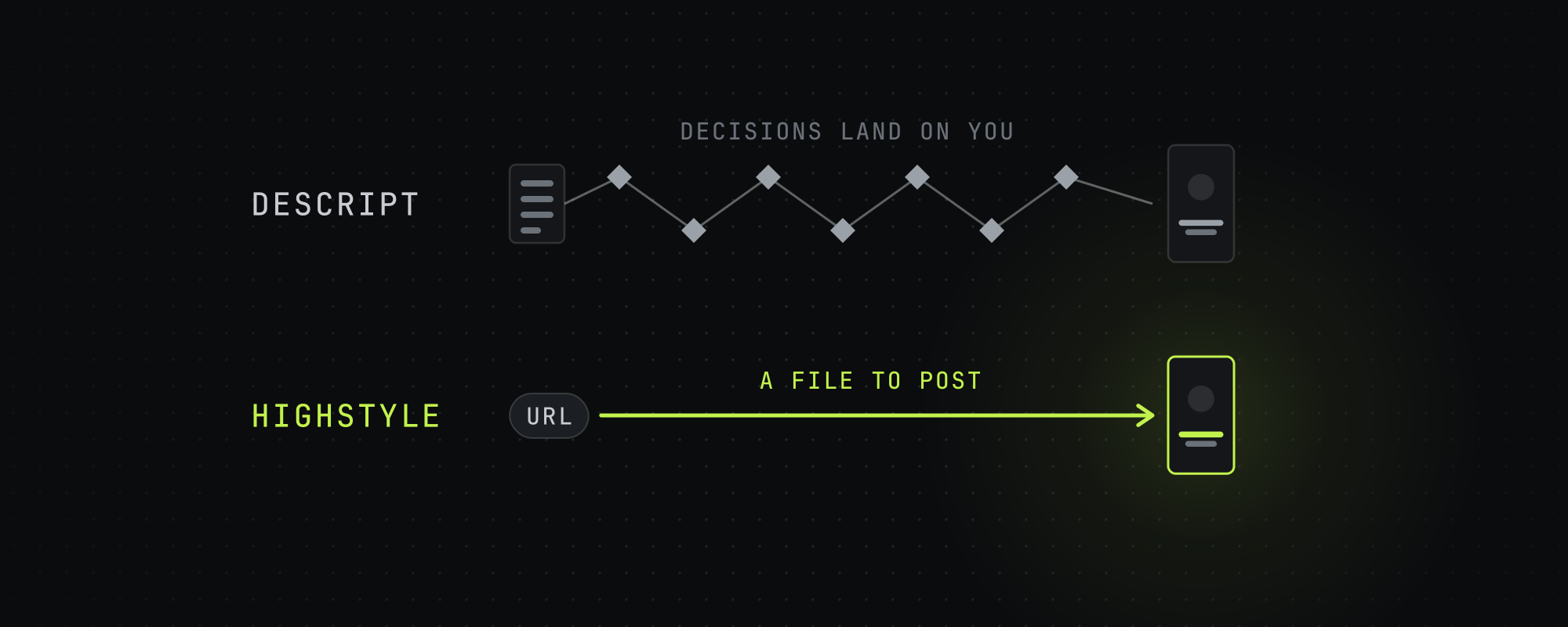
Count the decisions that land on you per clip: Descript hands you a clip to finish in its editor, and Highstyle hands you a file to post.
How each one picks a moment
Descript's clips page says it taught Underlord what works on social so it can find the moments most likely to get views, and its pricing page says Underlord picks your most viral-worthy moments. Neither page says what Underlord reads beyond the recording.
Highstyle reads the transcript too, and on a YouTube link it adds two signals from the people who already watched: the most-replayed graph and the timestamped comments under the video. Where several viewers rewound or commented on the same stretch, that stretch gets its own pass through the model, and a clip picked that way opens to show the comments that flagged it.
We measured how far to trust comments in July 2026. A timestamp that one person mentions lands at a median replay percentile of 54, which is chance, so a lone mention moves nothing. A stretch counts when its comments draw likes and several commenters agree, and most of all when the replay graph points at the same moment.
Fresh uploads carry almost no viewer signal, since the replay graph needs watch time and comments need days. On a video published an hour ago this adds nothing, and it does the most on a back catalog.
What Descript does better
If this list describes your work, Descript is the better buy.
- You cut a video by editing its transcript, and Highstyle has no editor at all.
- Studio Sound removes background noise and enhances speech, and Eye Contact adjusts your gaze so you seem to look into the camera.
- It makes custom voice clones, and it has stock AI voices and a gallery of over 35 avatars.
- It translates captions into 61 languages and dubs audio into 30.
- Rooms records up to 10 people in one session, straight into a project.
- Timeline export to Adobe Premiere and Final Cut Pro lets a finishing editor take over.
Descript competes with editors and recording tools, and Highstyle competes with other clippers. Plenty of people want one of each.
What each costs
Descript's plans cost $24, $35 or $65 a month per person, or $16, $24 or $50 a month billed yearly. Hobbyist includes 10 media hours and 400 AI credits a month, Creator 30 hours and 800 credits, and Business 40 hours and 1,500 credits. Highstyle's plans cost $19, $49 or $199 a month for 150, 500 or 2,500 minutes of source video, and its free plan is 60 minutes once, at signup.
Descript meters two things. Media hours count what you import or record, and AI credits count AI work like Underlord, Studio Sound and Eye Contact, so clipping with Underlord draws on credits as well as hours. Its MCP page warns that automated editing tends to use credits faster than editing by hand.
Highstyle meters one thing, minutes of source video. A run is never charged more than the length of the video you submit, and a failed run costs nothing. The pricing page has the detail.
APIs and agents
Descript's API comes with every paid plan at no extra cost and draws on the plan's AI credits and media minutes. It can import media, run any edit Underlord can do, and publish a share page or make a download link, and Descript calls it early access. Its MCP connector lets Claude or ChatGPT ask for edits, which land as projects in your Descript drive.
Highstyle's REST API and hosted MCP server come with every paid plan, from $19 a month, and spend the same minutes as the app. A request can ask for 1 to 50 clips and gets back finished clip files, each with a title, a hook and a score. The developer docs cover both.
Which one to pick
- You edit your own episodes and post a few clips a week: Descript. One tool covers the whole job.
- You're clipping a back catalog of YouTube videos for the first time: Highstyle, which reads the replay graph and comments those older videos have built up.
- You run clip accounts and post every day across several handles: Highstyle. Clips come back finished, so nothing waits in an editor.
- You need dubbing, avatars or voice cloning: Descript. Highstyle doesn't do those.
- You want an AI agent to run the work: either. Descript's MCP edits projects in its editor, and Highstyle's returns finished clips.
Running both
Plenty of people should. Let Highstyle find and cut the moments, then pull the two or three clips that deserve extra work into Descript for finishing. The scores tell you which ones those are. If you're comparing more clippers, the Opus Clip alternatives roundup covers five on price and limits, and the best AI video clipping tools in 2026 covers more.
Frequently asked questions
Is Highstyle a Descript alternative?
For the clipping part, yes. If you use Descript mainly to turn long recordings into short vertical clips, Highstyle does that job without a review step in an editor. If you use Descript to edit whole videos, record remote sessions, dub or make avatars, Highstyle doesn't replace it.
Can Descript make vertical clips for TikTok and Shorts?
Yes. Create Clips has Underlord find the moments, and you can change the aspect ratio, add captions and use Center Active Speaker to keep the speaker in frame. The clips land in Descript's editor, so you review and export each one.
How do Descript and Highstyle charge?
Descript meters media hours and AI credits separately, and clipping with Underlord spends credits. Highstyle meters minutes of source video only: 150, 500 or 2,500 minutes a month on its paid plans, and a run is never charged more than the length of its video.
What does Descript cost in 2026?
It's free to start, then $24, $35 or $65 a month per person, or $16, $24 or $50 a month billed yearly, plus custom Enterprise pricing. The free plan gives 1 media hour a month and 100 AI credits once, and exports at 720p with a watermark. We checked on October 15, 2026.
Do Descript and Highstyle have an API?
Both do, on every paid plan. Descript's API is in early access and works on projects you can publish to a share page or download, and its MCP connector works from Claude or ChatGPT. Highstyle's API and MCP server return finished clip files and spend the same minutes as the app.
Can I use both Descript and Highstyle?
Yes, and it's a sensible setup. Use Highstyle to pick and cut clips in bulk, then pull the highest-scoring ones into Descript when one deserves hand-finishing. The scores tell you which ones are worth the extra time.
Sources
Every figure above traces to one of these. Where a source sells the thing it measured, we say so.
- 01Descript pricing · Descript, read October 15, 2026Plans, prices, media hours, AI credits and features.
- 02Create clips · Descript, read October 15, 2026How Create Clips works, and the free plan.
- 03Descript API · Descript, read October 15, 2026What the API can do, what it costs, and its early-access status.
- 04Video editing MCP · Descript, read October 15, 2026
- 05Highstyle pricing · HighstyleOur own pricing page. The figures here come from the same code.
- 06Highstyle API and MCP docs · HighstyleOur own docs.
Keep reading
Opus Clip Alternatives in 2026: 5 AI Clippers Compared on Price and Limits
Five Opus Clip alternatives checked on October 15, 2026: Vizard, Reap, Klap, Submagic and Highstyle, compared on price, minutes, Twitch links and API access.
Highstyle vs CapCut (2026): Is Paid Clipping Worth It?
CapCut is a free editor with an AI clip maker, and Highstyle is a paid clipper that reads YouTube's replay graph and comments. Checked October 15, 2026.
The Best AI Video Clipping Tools in 2026
Nine AI clipping tools compared on price, limits and how each picks moments, from OpusClip and Vizard to Reap, Klap and Submagic. Checked October 15, 2026.
Highstyle vs OpusClip (2026): Which Picks Better Moments?
OpusClip clips almost any footage and starts at $15 a month. Highstyle reads YouTube's replay graph and comments to pick moments. Checked October 15, 2026.