Highstyle vs Submagic (2026): Long-Video Clipper or Caption Editor?
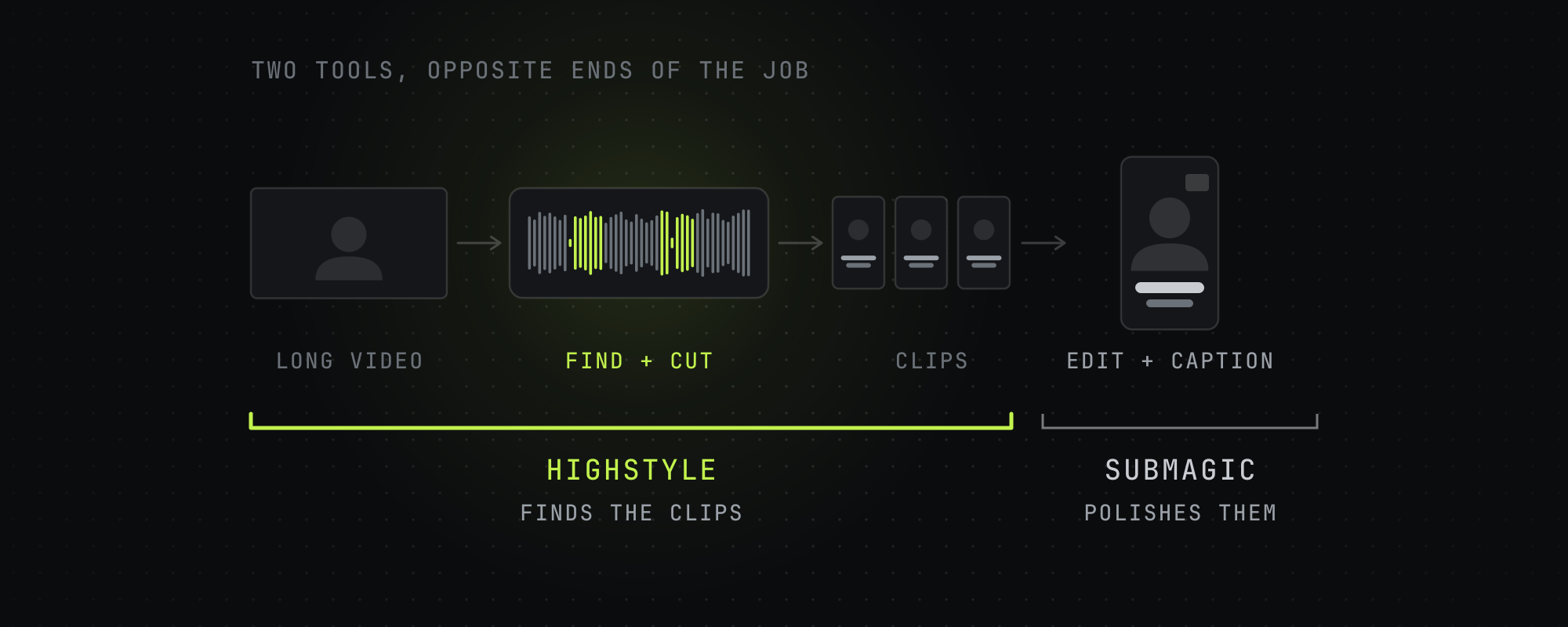
Pick Submagic to caption and edit short videos you already have: its plans cost $19 to $69 a month per member, and long-video clipping is a $19 add-on called Magic Clips. Pick Highstyle to turn a long video into finished clips: it reads YouTube's most-replayed graph and timestamped comments to choose the moments, and its plans cost $19, $49 or $199 a month for 150, 500 or 2,500 minutes of video.
Submagic and Highstyle show up in the same searches, but they start at opposite ends of the job. Submagic is a caption and editing tool for short videos, and cutting a long video into clips is an add-on. Highstyle starts from the long video and hands back finished clips, so the choice comes down to which half of the work you want a tool to do.
We read Submagic's pricing page and help center on October 15, 2026, and each Submagic figure below links to its page. Highstyle is our product, so its column sticks to what our pricing page and API docs say.
Side-by-side at a glance
| Highstyle | Submagic | |
|---|---|---|
| Starts from | A long video: a YouTube link, or an upload of at least a minute | A short video to caption and edit. Magic Clips takes long ones |
| What comes back | Up to 10 captioned 9:16 clips, ranked best first, each with a score, a title and a cover | The edited video. Magic Clips returns 20 or more clips with a virality score |
| Long-video clipping | Every plan | Magic Clips add-on, $19 a month for 10 uploads |
| Longest source | 12 hours on paid plans, 4 on free | 2, 5 or 30 minutes per upload, by plan |
| Monthly price | $19, $49 or $199 | $19, $39 or $69 per member |
| Yearly price | $159, $409 or $1,669 a year | $144, $276 or $492 a year per member |
| A month buys | 150, 500 or 2,500 minutes of source video | 15, 40 or 100 videos |
| Free option | First video free: 60 minutes once, watermarked, no card | A trial of 3 short videos, watermarked |
| Captions | 18 burned-in styles, TikTok's own look by default, plus a plain campaign-safe style | Animated templates with emoji, plus B-roll and auto zooms |
| Picks moments from | The transcript, YouTube's most-replayed graph and timestamped comments | AI that scores moments for virality |
| Export | 9:16 MP4 | 1080p, 2K on Pro, 4K at 60fps on Business |
| API | Paid plans, plus an MCP server for Claude | 10 API minutes a month on Starter and Pro, 100 on Business, packs from $57 |
Submagic's figures are from its pricing page and help center on October 15, 2026. Yearly totals are its monthly-equivalent prices of $12, $23 and $41 times twelve.
Submagic gives you more ways to edit a clip
Once a clip exists, Submagic has more controls than we do. Its pricing page lists animated caption templates, B-roll from Storyblocks on Pro, auto zooms, removal of bad takes and silences, clean audio, a brand kit and publishing with analytics. Business adds 4K export at 60fps, logos and brand assets and a custom words dictionary, and no paid plan carries a watermark.
Submagic's Magic Clips page claims 99% caption accuracy and transcription in 123 languages. Those are Submagic's own figures, and we haven't tested them. If your clips already exist and the captions are what's holding them back, Submagic is the better buy.
Highstyle picks the moments from how viewers reacted
Highstyle starts a step earlier. Paste a YouTube link or upload a file, and it transcribes the video, picks the moments, trims filler and long pauses, reframes to 9:16 and burns in captions. You get up to 10 clips ranked best first, each with a score from 1 to 10, a title and a cover image.
On a YouTube link it also reads the most-replayed graph and the timestamped comments under the video. Where several viewers rewound or commented on the same stretch, that stretch gets its own pass through the model, and a clip picked that way opens to show the comments that flagged it. Submagic's Magic Clips page describes an AI trained on social media that scores moments for virality, and it doesn't mention replay or comment data.
Three goals set the length and look of a run. Most views makes 15 to 35 second clips, Creator Rewards makes 70 to 180 second clips for TikTok's paid program, and Campaign-safe uses plain captions with no effects for brand campaigns that ban animated ones. How to caption short-form videos covers when each caption style fits.
Price depends on what you count
Submagic counts videos and Highstyle counts minutes of source, so the plans don't line up one to one. Submagic's Starter is $19 a month per member for 15 videos of up to 2 minutes, and Magic Clips adds 10 long-video uploads for another $19, so clipping long videos there starts at $38 a month for one person on monthly billing. Highstyle's Starter is $19 a month for 150 minutes, about 2.5 hours of video, and Pro is $49 for 500 minutes.
Submagic's help center caps each upload at 2 minutes on Starter, 5 on Pro and 30 on Business, and it doesn't say whether Magic Clips uploads follow the same cap. If you clip hour-long episodes, ask Submagic before you pay.
Yearly billing lowers both. Submagic's Starter drops to $12 a month per member, and Highstyle's Starter costs $159 a year, about 30% less than paying monthly. Submagic prices every plan per member, so a team of three pays three times.
Which one to pick
- You film short videos yourself and want them to look edited: Submagic.
- You have long videos, like podcasts, interviews or streams on YouTube, and want the clips found and cut for you: Highstyle.
- You need B-roll, zooms, 4K or posting from the same tool: Submagic.
- You clip for brand campaigns that ban animated captions: Highstyle's Campaign-safe goal.
- You clip hour-long sources every week: Highstyle, which takes sources up to 12 hours on paid plans, unless Submagic confirms Magic Clips takes your length.
- You want to run clipping from Claude or your own code: Highstyle, whose API and MCP server come with every paid plan and spend the same minutes as the app.
Your first video on Highstyle is free, so paste one of your YouTube links on the home page to see what it picks. If you're weighing more than these two, the Opus Clip alternatives roundup compares five tools on price and limits.
Frequently asked questions
Is Highstyle a good Submagic alternative?
If you start from long videos, yes. Highstyle finds the moments, cuts them and captions them in one run, and on YouTube links it reads the most-replayed graph and timestamped comments to choose them. If you already have short videos and want more editing tools, Submagic does more after the cut.
Can Submagic turn a long video into clips?
Yes, with Magic Clips, a separate add-on that costs $19 a month for 10 uploads according to Submagic's help center. It takes a YouTube link, a file or a public Google Drive link and returns 20 or more clips with a virality score.
Which is cheaper, Highstyle or Submagic?
Submagic starts at $19 a month, and Highstyle at $19. Submagic's $19 buys 15 short videos per member, and clipping long videos adds $19 for Magic Clips. Highstyle's $19 buys 150 minutes of source video. Billed yearly, Submagic's Starter is $12 a month per member and Highstyle's Starter is $159 a year.
Do Highstyle and Submagic add a watermark?
Only on free output. Highstyle's first video is free, 60 minutes once at signup, with a small watermark, and paid plans export clean. Submagic's trial takes 3 short videos and drops the watermark once you subscribe.
Which has better captions?
Submagic gives you more editing controls: animated caption templates with emoji, plus B-roll and zooms. Highstyle has 18 burned-in styles, defaults to TikTok's own caption look, and its Campaign-safe goal uses plain captions with no effects.
Do Highstyle and Submagic have an API?
Both do. Highstyle's API and MCP server come with every paid plan and spend the same minutes as the app. Submagic includes 10 API minutes a month on Starter and Pro and 100 on Business, and sells more in packs that start at $57 a month for 250 minutes.
Sources
Every figure above traces to one of these. Where a source sells the thing it measured, we say so.
- 01Submagic pricing · Submagic, read October 15, 2026Plans, per-member prices, features and API credit packs.
- 02How much does it cost to use Submagic · Submagic help center, read October 15, 2026The Magic Clips add-on price and upload count.
- 03Size and video length limit for each video · Submagic help center, read October 15, 2026
- 04How to use Magic Clips · Submagic help center, read October 15, 2026
- 05Magic Clips · Submagic, read October 15, 2026Submagic's own accuracy and language claims.
- 06Does Submagic have a free trial · Submagic help center, read October 15, 2026
- 07Highstyle pricing · HighstyleOur own pricing page. The figures here come from the same code.
- 08Highstyle API and MCP docs · HighstyleOur own docs.
Keep reading
Opus Clip Alternatives in 2026: 5 AI Clippers Compared on Price and Limits
Five Opus Clip alternatives checked on October 15, 2026: Vizard, Reap, Klap, Submagic and Highstyle, compared on price, minutes, Twitch links and API access.
Highstyle vs Vizard (2026): Price, Limits and How Each Picks Clips
Vizard sells more minutes per dollar, 4K exports and scheduling. Highstyle reads YouTube's replay graph and comments to pick moments. Checked October 15, 2026.
How to Caption Short-Form Videos for TikTok, Reels, and Shorts (2026)
A practical guide to captioning short-form videos: font, size, placement, word grouping, color emphasis, and the sync rules that lift retention in 2026.
Highstyle vs OpusClip (2026): Which Picks Better Moments?
OpusClip clips almost any footage and starts at $15 a month. Highstyle reads YouTube's replay graph and comments to pick moments. Checked October 15, 2026.